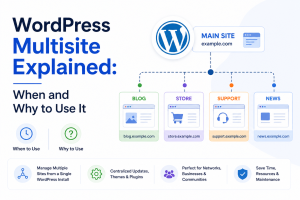
Imagine a university with an engineering faculty, a medical faculty, a law faculty, and a business faculty. Each one needs its own website, its own content, its own way of speaking to its own students. The obvious way to build this is four separate WordPress installations, four sets of updates, four sets of plugins, and four sets of logins to remember. WordPress Multisite exists so that the university does not have to do that four times over. It builds all four websites from one installation instead, managed from a single dashboard.
That is the whole idea, and this article walks through what WordPress Multisite actually is, when it genuinely makes sense to use it, when it does not, and what kind of hosting a network like this actually needs to run well.
WordPress Multisite is one of the features within WordPress, in which multiple sites can be created and managed using just one WordPress installation.
Generally, there is one WordPress installation used for one single site. However, once Multisite mode is activated, one single WordPress installation can host multiple sites at once.
Back to the university example: instead of 4 different installations, each with their own updates, plugins, themes, backups, and users to manage, there is one installation with 4 sites underneath it. One network dashboard that an administrator logs into can see and manage all four. Each department still has its own pages, posts, menus, and users. Instead of installing WordPress three times, you install it once and create multiple websites under that single installation.
The honest answer to “when should you use WordPress Multisite?” comes down to one underlying question: do your websites need to be different but managed as if they were one thing? If the answer is yes, Multisite is built for exactly that situation.
WordPress Multisite makes sense specifically when you have several related websites that share common management, related in ownership, related in structure, or related in purpose, even if the actual content on each site looks nothing alike. The word “doing the real work” in that sentence is “related”. Multisite does not ask your sites to look the same or say the same thing; it asks them to belong to the same organisation so that managing them together actually saves effort instead of creating complications.
Here is what that looks like across the situations where this comes up most often:
A university might have an engineering department, a medical department, a law department, and a business department, each with its own website, its own content, and its own way of speaking to its own students. Without Multisite, that is four separate WordPress installations, four sets of plugin updates, four sets of security patches, and four separate places where something can go wrong.
With Multisite, one installation runs all four, and the university’s IT team manages updates and security centrally, while each department still keeps full control over its own pages, its own admissions content, and its own faculty listings. The departments stay independent in what they publish; the technical burden stops being multiplied by four.
The same logic applies at a smaller scale. A school group with several branches needs a separate website for each branch, since each one has its own admissions process, its own events, and its own local announcements.
But those branches are still one school group underneath, and a multisite network lets one central team handle the technical side, updates, backups, and security, while each branch’s staff manages their own content without needing to understand WordPress administration themselves.
This is one of the clearest cases for why Multisite exists. A franchise with locations in Mumbai, Delhi, Pune, and Bangalore needs each city to have its own website, since local offers, local contact numbers, and local branding genuinely differ from one location to the next. But the franchise as a whole wants consistency: the same overall look, the same core message, the same brand standards enforced everywhere.
Multisite lets every location run its own site while the franchise’s central team enforces that consistency from one place, rather than hoping every franchisee manages their own WordPress installation correctly.
Government bodies often have this exact structure already: several departments, each needing its own public-facing website, all falling under one larger administrative umbrella.
Multisite lets each department control its own content and announcements, while a single IT team manages security and updates across every department’s site at once, which matters even more in government, where security consistency across departments is not optional.
A media group running separate verticals for news, sports, entertainment, and business needs each one to have its own identity, its own editorial team, and its own audience.
But all four verticals are still owned by the same media company, and Multisite lets the parent company maintain one technical backend overseeing all four, without forcing every vertical into looking or sounding the same.
The same pattern shows up at a corporate scale: different brands or business units, each needing its own website and its own market positioning, but all belonging to one company. Multisite lets the corporation manage all of it from a single place, without needing a separate IT process for every brand under its umbrella.
Across every one of these, the deciding factor is never really the number of sites; it is whether those sites are different expressions of the same underlying organisation. That relatedness is what turns “several websites” into “a network worth managing together”, which is the entire reason Multisite exists in the first place.
One dashboard manages multiple websites. Without Multisite, an administrator managing five related sites has to log into five separate WordPress backends, remember five separate sets of credentials, and repeat every routine task five times over, checking for updates, reviewing plugin conflicts, and monitoring uptime.
With Multisite, all of that happens from one network dashboard. The administrator sees every site in the network at a glance, and a task that used to mean five separate logins becomes one.
This alone is often the reason organisations move to multisite, not because any single task is hard, but because the same task repeated five, ten, or twenty times becomes its own kind of burden.
Plugins, themes, and the WordPress core get updated once across the entire network, instead of once per site. This matters more than it sounds. A missed update on even one site in a network of separate installations can leave that one site vulnerable, while the rest stay current, a gap that is easy to lose track of once you are managing more than two or three sites.
Multisite closes that gap by design: when the core updates, every site in the network updates with it, so there is no site quietly falling behind because someone forgot to log into it that month.
A theme or plugin gets installed once, at the network level, and can then be made available across every site in the network, though individual sites can only use what the network administrator specifically allows them to.
This does two things at once: it saves the repeated effort of installing and licensing the same plugin five separate times, and it gives the network administrator a genuine layer of control over what each site can and cannot run.
A department cannot install an unapproved plugin on their own site because they are working within what the network makes available to them, not managing their own independent WordPress instance.
Users can hold different roles on different sites while still being managed within the same overall network. A single person might be an editor on one site and have no access at all to another, and that separation is handled cleanly within Multisite’s user system, rather than needing a completely separate login and user database for every site.
For an organisation with staff who work across more than one site, a marketing team supporting several franchise locations, for instance, this avoids the mess of separate accounts for the same person across five different WordPress installations.
An organisation can maintain one unified look and feel across every site in its network, while still letting each individual site customise its own content underneath that shared foundation. Think of it like a shared shell with a different room built inside each one:
The outer structure, the branding, the header and footer stay consistent, but what happens inside each site’s own pages and posts is still under that site’s own control. This matters most for franchises and corporations, where brand consistency across locations or units is often a real requirement, not just a preference.
Managing one installation generally requires less administrative effort than maintaining many independent ones, and less admin time translates fairly directly into lower cost, whether that is in-house staff time or an external agency’s hours.
This is not usually the single deciding factor on its own; the relatedness of the sites still matters more, but for an organisation already convinced Multisite fits their situation, the reduced ongoing management cost is often what makes the decision easy rather than difficult.
Taken together, these six reasons are really one underlying idea, said six different ways: when your sites are related, managing them as one network costs less time, less risk, and less repeated effort than managing them as five, ten, or twenty separate installations ever would.
| Aspect | Multiple Single Installations | WordPress Multisite |
| Management | Separate, per site | Centralised, one dashboard |
| Updates | Repeated, once per site | Done once, across the network |
| Themes & plugins | Installed separately per site | Shared from one place |
| Branding | Independent per site | Consistent by default, customisable per site |
| Independence | Full independence | Shared installation and database |
| Hosting | Can differ per site | Same server/environment for all sites |
| Best fit | Unrelated sites, or sites needing full independence | Related sites under one organisation |
The choice between the two really comes down to one thing: do your sites benefit from being managed together, or do they need to stay fully independent?
Multiple single installations give each site complete independence — its own plugins, its own theme choices, its own updates on its own schedule, and its own hosting environment if needed. That independence comes at the cost of repetition: every update, every plugin install, every backup happens separately, once per site, and that repeated effort only grows as more sites get added.
Multisite trades some of that independence for centralised control. Updates happen once, across the whole network. Themes and plugins get approved and shared from one place. Branding stays consistent without extra effort. In exchange, every site in the network shares the same installation and the same underlying database, so the sites are never fully separate from each other the way standalone installations are.
If your sites are related – the same organisation, the same brand, and the same team managing them – Multisite usually saves more time than it costs. If the sites are unrelated, need full independence, or need different hosting environments entirely, separate installations remain the safer, more flexible choice.
As a multisite network grows, the hosting underneath it matters more than it does for a single WordPress site, simply because every site in the network is drawing from the same shared resources at once.
A network with several content-heavy sites, image-heavy pages, media libraries, and uploads across multiple departments or locations builds up storage needs faster than a single site would. The type of storage matters here, not just the amount.
NVMe SSD storage reads and writes data significantly faster than older SATA SSDs or traditional hard drives, and on a network where every site is competing for the same storage, that speed difference is what keeps pages loading quickly across the board rather than just for whichever site happens to get priority.
Every request across every site in the network – a page load, a plugin running, an admin logging in – draws from the same processing resources. A single site rarely maxes these out.
A network of five, ten, or twenty sites, each with their own visitors and their own admin activity, puts sustained load on the same shared pool, so the headroom that felt generous for one site can disappear quickly once the network grows.
Multisite runs every site in the network through one shared database structure. This is one of the most overlooked parts of multisite hosting; a slow database does not just affect one site’s speed; it affects every site’s speed at once, since they are all querying the same underlying database. As content and users grow across the network, database performance becomes one of the first things to feel the strain.
A backup for a multisite network has to account for the entire network as a single unit, not one site in isolation. This changes how backups need to be planned and sized from the start, since restoring one site is rarely as simple as it would be with a standalone installation.
Every site in the network shares the same core and database, so the hosting environment’s overall security posture matters to the whole network, not just to individual sites within it.
Downtime on a multisite network takes every site in the network offline at once, not just the site experiencing the issue. For a network spanning multiple departments, locations, or brands, that single point of failure is a real operational consideration, not a minor technical detail.
A multisite network tends to grow in a specific way over time, not just more traffic, but more sites being added to the same installation. Hosting needs room to grow with that, so that adding a new department or franchise location does not mean migrating the entire network to new infrastructure.
host.co.in‘s VPS and dedicated hosting plans are built with this kind of load in mind — the CPU, RAM, and NVMe SSD storage a growing Multisite network needs, along with the uptime and scalability to keep every site in the network running as it expands, not just the first one.
Picture a business selling electronics, laptops, and accessories that started in India. Pricing, product range, and positioning are all built around the Indian market. As the company grows and starts selling internationally, that pricing does not carry over cleanly: costs, currency, and what the market is willing to pay all shift once you are selling outside India, and the same products often need to be positioned differently, sometimes swapped for different variants altogether.
This is not something translation fixes. Even in English throughout, the international site still needs its own pricing, its own product positioning, and its own way of presenting the same laptop to a different market. What changes here is the business itself, not the language: so this genuinely needs to be two separate sites with two separate sets of content, not one site with regional variations layered on top.
Running this as two entirely separate WordPress installations means two logins, two sets of plugin updates, and two separate security patches to keep track of, doubling the technical workload for what is still, underneath it, one company. This is exactly where Multisite fits: one WordPress installation runs both sites. The Indian site and the international site each keep their own pricing, their own product listings, and their own content, fully independent of each other, but updates, security patches, and plugin management happen once, across both, instead of twice.
That is the real test for whether Multisite fits a business like this: not how many countries it operates in, but whether the sites can be managed together technically, even while running completely different pricing and content underneath.
Multisite runs several websites from one shared WordPress installation, managed centrally. Multiple installations run each website entirely separately, with its own updates, plugins, and management, at the cost of more repeated admin work.
A multisite itself does not help or hurt SEO directly — the same principles apply as a single WordPress site. What actually matters is whether each site’s content is genuinely distinct, which it usually is in a proper multisite setup, since each site serves its own purpose rather than duplicating another site’s content.
No. All sites in a multisite network share the same WordPress installation and the same server. If different sites genuinely need different hosting environments, separate installations are the better choice.
Often, yes, in terms of administrative effort — managing one installation typically takes less time than managing several. Hosting still needs to account for the combined load of every site in the network, though, not just one.
Yes, WordPress supports converting a single installation into a multisite network, though it needs to be planned carefully; existing plugins and themes need to be checked for multisite compatibility first, and it is worth backing up the site before making the change.
WordPress Multisite is a built-in feature that lets an organisation run multiple, genuinely separate websites from a single installation, separate not because of language or geography, but because the sites are administratively or operationally distinct, like a university’s departments or a business running different pricing for different markets. It centralises updates, users, themes, and plugins while letting each site keep full control over its own content underneath that.
It is not the right fit for every situation. Unrelated sites, those that need full independence, or those that require different hosting environments are usually better off as separate installations. Multisite is only one of a few ways to run multiple sites under one roof — if you are still weighing your options, our guide on hosting multiple websites on one hosting account walks through the other approaches too, including add-on domains and subdomains, so you can see which one actually fits before committing.

Prathamesh Suryawanshi