You’ve probably filled out a form online, say, ordering food through an app. You type in your address, pick your dish, and hit submit. What you see on screen – the neat boxes, the “Place Order” button, the little cart icon – that’s HTML doing its job. It’s the waiter, basically. It takes your order and presents it nicely.
But behind that screen, once you hit submit, your order stops being a pretty button. It turns into something like:
<order>

<item>Paneer Veg</item>

<quantity>2</quantity>

<address>MG Road, Bengaluru</address>

</order>
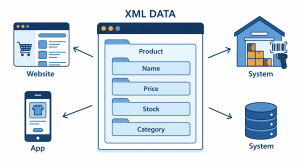
That’s XML. Nobody’s meant to “see” this the way they see the app screen; that’s just data, packaged up so the kitchen system, the delivery app, and the payment gateway can all pass it around and understand exactly what’s in it, as long as they agree on the structure and meaning of the data, without needing to agree on how it should look
In technical terms, XML provides a structured way to represent and exchange data, but the systems exchanging that data still need to agree on what the elements mean and how the document should be structured.
So really, HTML and XML were never competing for the same job. One’s the waiter who takes your order and makes it look good. The other is the ticket that actually gets your order to the kitchen.
|
Factor |
HTML | XML |
| Primary purpose | Displays and structures content for the web | Stores and transports structured data |
| Designed for | Humans viewing a page in a browser | Systems exchanging or storing data |
| Tags | Predefined set (<p>, <div>, <table>, etc.) | Custom: you define your own tag names. |
| Case sensitivity | Not case-sensitive (<P> and <p> are the same) | Case-sensitive (<Order> and <order> are different) |
| Error handling | Forgiving, browsers render most broken HTML anyway. | Strict, a single unclosed tag breaks the whole document. |
| Data structure | Presentation-focused, loosely hierarchical | Strictly hierarchical, tree-like |
| Common uses | Web pages, forms, layouts | Data exchange (APIs, feeds), config files, sitemaps |
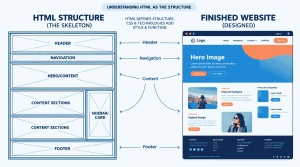
HTML stands for HyperText Markup Language, and honestly, the name tells you most of the story if you break it down. “Markup” is the key word; it’s a language for marking up content: this bit’s a heading, this bit’s a paragraph, and this bit’s a link. It’s the skeleton of every webpage you’ve ever visited.
On its own, though, HTML is pretty plain. It defines structure and content – headings, paragraphs, images, links, and the actual “what’s on this page” – but that’s where its job stops. Think of it like the framing of a house: walls up, rooms marked out, doors where doors should be. It doesn’t decide what colour the walls are painted or whether the door swings open smoothly or creaks. That’s not HTML’s department.
That’s where CSS and JavaScript step in. CSS is the paint job, the furniture, and the whole aesthetic: fonts, colours, spacing, and layout. JavaScript makes things move and respond: a button that reacts when you click it, a menu that slides open, and a form that checks your input before letting you submit. HTML alone gives you a static page. Bring in CSS and JavaScript, and that same page can animate, react, and behave almost like an app.
So HTML by itself is really just structure and text. Everything that makes the modern web feel alive – the fancy transitions, the interactivity – is layered on top of it, not built into it.
XML stands for Extensible Markup Language, and that word “Extensible” is really the whole point; unlike HTML, which hands you a fixed set of tags to work with, XML lets you make up your own. There’s no predefined <order> or <price> tag sitting around waiting to be used; you create tags that describe whatever data you’re actually working with.
But here’s the part that trips people up: XML was never built to be looked at. It doesn’t care about fonts, colours, or how something lays out on a screen, because, unlike HTML, its job isn’t to be seen by a person in a browser. Its job is to describe data clearly enough that any system, program, or app can read it and know exactly what’s what, according to the agreed structure and meaning of the data.
Go back to that food order example: once you hit submit on an app, your order doesn’t need to “look” like anything anymore. It just needs to carry the details accurately from one system to the next: what you ordered, how much, and where it’s going. That is precisely the job XML was created to do: to wrap information in a structured and predictable way so that it can travel from one system to another without losing its meaning.
That’s why you’ll often see XML working behind the scenes, in data feeds, configuration files, API responses, and sitemaps, doing the unglamorous but necessary job of moving information from one place to another, intact and unambiguous.
Now that you know what each one actually is, it’s worth putting XML and HTML differences side by side properly, not just as two separate definitions, but as two different answers to the same underlying question: what is this markup actually for?
Every difference: XML and HTML that follows in this section – the tags, the strictness, the error handling – all trace back to one decision made right at the start: who is this markup written for?
HTML comes with a fixed set of tags already meaning something: it <p> always means a paragraph and <img> always means an image, because a browser needs to know in advance how to render every tag it encounters.
Nobody is meant to sit and read raw XML the way they read a webpage, which is exactly why it does not come with a fixed vocabulary. A <price> tag means whatever you define it to mean, because the only thing reading it is another program that already agrees on what that tag stands for.
That single difference in purpose, human-facing display versus system-to-system data exchange, is the reason HTML can afford to be forgiving and XML cannot. A browser can guess what you meant by a missing closing tag, because a human is still going to glance at the result and notice if something looks off.
A system parsing an XML file has no equivalent safety net; nobody is watching the exchange happen in real time to catch a mistake before it causes a problem further down the line. Every other difference in this section grows out of that one fact.
HTML and XML both use tags, but that similarity stops at the surface. What each one is allowed to call a tag, and who gets to decide, is where they properly diverge.
HTML works from a fixed, predefined vocabulary. <p> means a paragraph, <a> means a link, <table> means a table, and that meaning is not something you get to change. Every browser on earth already knows what these tags mean before it even opens your page, which is precisely why they had to be agreed upon in advance. You can use them, but you cannot invent new ones and expect a browser to know what to do with them.
XML flips that entirely. There is no predefined list of tags to choose from, because XML was never built to describe one fixed kind of content the way HTML was built to describe web pages.
Instead, you define the tags yourself, based entirely on what your data actually is.
Building a system for book records, <title>, <author>, and <isbn> might make perfect sense as element names. Building one for food orders, as we saw earlier, <item> and <address> do the job instead.
Neither set of tags means anything to a browser, and that is fine, because a browser was never meant to read them in the first place. The only thing that needs to agree on what <isbn> means is whatever system or application is actually parsing that particular document.
This is the same purpose-driven split from the last section, just visible now in something concrete rather than in the abstract. An invoice looks nothing like a product catalogue, which looks nothing like a configuration file, and XML’s open tagging system exists specifically to accommodate that variety.
This is where most of the practical difference between XML and HTML actually shows up on the page, not in what the tags mean, but in the rules governing how they are written.
If an XML document breaks even one structural rule – an unclosed tag, a mismatched case, or more than one root element – a parser does not attempt to guess what was intended. It simply stops and reports an error; the entire document is treated as broken. This is sometimes called a “fail-fast” or “draconian” approach to parsing, and while that might sound harsh next to HTML’s easy-going nature, it is exactly what makes XML trustworthy for the job it was built to do.
When a payment system or an inventory feed is reading a document, there is no human standing by to notice that something looks slightly off before money moves or stock gets miscounted. A document that is even slightly wrong needs to fail loudly and immediately, not get silently patched over and passed along with an error hiding inside it.
So the comparison of the HTML vs XML difference here really comes down to what each format is optimised to protect. HTML protects the reader’s experience; a page should still show up even if the code behind it is imperfect. XML protects the integrity of the data itself; a document should never be allowed to pretend it means something other than exactly what it says.
An order document could be perfectly well-formed, every tag closed correctly, and still be invalid against its schema if, say, the schema expects a numeric quantity and the document instead contains text. XML’s validation step exists precisely to catch that kind of mismatch before the document ever reaches the system meant to act on it. HTML has something similar in principle but is far less commonly enforced in practice. HTML documents can be checked against the W3C’s official HTML specification, essentially the same idea as an XML schema, spelling out what a properly structured HTML document should contain.
In practice, though, almost nobody relies on this the way XML systems rely on schema validation, because a browser is going to render the page regardless of whether it validates or not, so the incentive to formally validate HTML is mostly about best practice and accessibility rather than necessity.
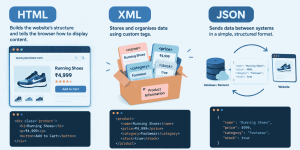
Up to this point, this guide has only talked about two formats, but there is a third one worth bringing in here, because it is the one most people actually run into without realising it: JSON, short for JavaScript Object Notation.
Go back to the food order example running through this guide. HTML is what displays the order screen, the button, the cart icon, and the text you actually read. XML, as shown earlier, is one way that order can be labelled and passed along once it leaves the screen.
But in practice, when a modern app requests information, say, a user searches for product 123 and the app needs to fetch that product’s details from a server, the data moving back and forth between those two systems is far more likely to be JSON than XML.
JSON exists for exactly that job: carrying data between systems, cleanly and predictably, the same role XML plays, but in a lighter, less verbose form. Where XML wraps every piece of data in opening and closing tags, <price>499</price>, JSON represents the same information as a simple key-value pair instead:
{

"product_id": 123,

"name": "Wireless Mouse",

"price": 499,

"in_stock": true

}
No tags, no closing elements to match, just a straightforward, standardised structure that both a server and a browser’s JavaScript can read and use immediately, without any extra parsing step in between.
|
Factor |
HTML | XML | JSON |
| File size and verbosity | Moderate tags add some weight. | Heaviest, every value needs an opening and closing tag. | Lightest key-value pairs with minimal overhead |
| Parsing speed | Not applicable, rendered rather than parsed | Slower, tree structure takes more work to process. | Faster, maps directly onto native data structures |
| Native JavaScript support | Not applicable | Requires a separate parser | JSON can be directly parsed and converted into JavaScript objects. |
| Comments allowed | Yes | Yes | No, JSON has no comment syntax at all. |
| Data types | None; everything is just text and tags | None; everything is text unless a schema defines otherwise. | Built-in: strings, numbers, booleans, arrays, objects, null |
| Learning curve | Low; most people can read HTML on sight. | Moderate, verbose but logical | Low, close to how most programming languages already think in data |
Whether the question is XML versus HTML, HTML versus XML, or where JSON fits between the two, the answer never comes down to which format is objectively better. What actually decides it is what the data is for: whether a human needs to read it, whether a system needs to parse it fast, and whether that system already speaks XML or JSON. Anyone still asking what is difference between xml and html at this point has the full picture already; JSON is simply the third option that shows up once data needs to move, not just display.
Every comparison so far has been about telling HTML and XML apart. This section is narrower, just the practical scenarios where HTML is actually the right tool to reach for.
The common thread through every one of these: the moment content needs to be read, clicked, filled in, or watched, HTML is the format doing that work.
The common thread here is the same one running through this whole guide: XML belongs wherever a system, not a person, is going to read the result, and where the cost of a mistake going unnoticed is high enough that strict, fail-fast structure matters more than convenience.
This one deserves its own section, because “XML vs HTML” means something quite specific here, and the two are easy to mix up if you have not run into sitemaps before.
An XML sitemap is a file, usually named something like sitemap.xml, that lists every important URL on a website in a structured, machine-readable format, built for search engines rather than for people. It typically looks something like this:
<url>

<loc>https://example.com/product-123</loc>

<lastmod>2026-09-01</lastmod>

</url>
Search engine crawlers read this file to understand what pages exist on a site, when they were last updated, and how they are structured, all without needing to click through every link manually. Nobody is meant to open an XML sitemap and browse it the way they browse a website; it exists purely to help search engines index a site more efficiently.
An HTML sitemap, by contrast, is an actual page on the website itself, one a visitor can open and read, usually listing links to the site’s main sections and pages in an organised way. It looks and functions like any other webpage, built with the same tags used everywhere else on the site.
Its purpose is almost entirely about people: helping a visitor find a page they are looking for, especially on a large site where the main navigation menu does not cover everything.
The distinction here maps almost perfectly onto the difference between XML and HTML covered throughout this guide, just applied to one specific use case.
HTML and XML were never really competing for the same job. In practice, the choice rarely comes down to which format is better in the abstract. HTML is the right call whenever a person needs to see, read, or interact with the result. XML earns its place wherever strict, hierarchical data needs to move between systems reliably: sitemaps, legacy platforms, and certain document formats. JSON takes over where that same job needs to happen faster and with less overhead, particularly in web and API environments.
Knowing what the difference is between XML and HTML was never really about picking a winner. It comes down to a simpler question: is this for a person to read or a system to process? Answer that, and the right format follows on its own.
Once an HTML website is ready to go live, choosing a suitable hosting solution is an important next step. With HTML hosting from host.co.in, individuals and businesses can find a suitable environment to publish their websites and make their content accessible to visitors online.

Madhavi Potdar