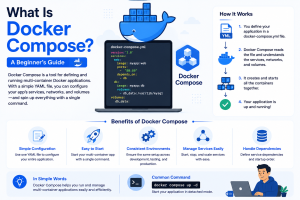
Imagine a company has a design team, a frontend team, a development team, a backend team, and a records team. Docker made a separate container for each component, letting them work in their environment, but as this work is linked to each other, they are difficult to communicate with each other.
So here Docker Compose comes in, where it combines all things that belong to the same application. Now that all departments work together on a task, the process becomes easy, and that’s what Compose does. When a developer runs the application, each container has its own distinct environment; code may require a backend, design may require a frontend, and so on, but as all belong to one application itself, Docker Compose links these containers together rather than making the developer start each one separately.
To understand Docker Compose, it is helpful to first understand the problem it solves.
Let’s say you are building an e-commerce application. The frontend website is built with React, and the backend API is built with Node.js. We use MySQL for storing product information and Redis for caching. Each of these components is running in its own Docker container.
Without Docker Compose, you would have to start each container one by one. You’d have to manually set up Docker networks, set up communication between the containers, expose ports, set environment variables, ensure the services start in the right order, etc. This can be done for two containers, but the problem becomes much harder as the application grows.
Now imagine you are showing your project to another programmer. They need to replicate the same environment on their machine. The application may fail due to missing configuration or the wrong command. This often leads to the classic problem of software that works on one developer’s machine but not on another.
Docker Compose fixes these problems by letting you define your entire environment as code. All services, networks, volumes, and configuration parameters can be stored in a single file that is attached to the project. This allows anyone to quickly and reliably reproduce the same environment.
In simple words, Docker Compose is a tool that lets you define and run multi-container applications using a single file. Instead of opening a terminal and starting your frontend container, then your backend container, then your database container one by one, you write all of them down in one place, and Compose starts them together, in the right order, connected.
Think of it like a restaurant kitchen. The chef needs the grill, the prep station, and the plating counter working at the same time, not one after another, and not disconnected from each other. Someone still has to tell all three stations to start together and pass work between them. That coordinator role, inside an application, is what Docker Compose plays.
Picture an application with three separate pieces: a frontend, a backend, and a database. Each one can run in its own container, which is great for keeping things isolated and portable, but it also means you now have three separate containers to manage instead of one.
Without Compose, that means doing this by hand for every single piece:
Do that once, and it is manageable. Do it every time you restart your project, or every time a teammate needs to set the same thing up on their own machine, and it quickly becomes repetitive, easy to get wrong, and genuinely tedious.
With Compose, you define the whole setup once, in a single file, and Compose handles starting, connecting, and managing all three containers together as one unit. Instead of three separate manual steps, it becomes one command.
The main point is simple: Compose does not change what containers do; it changes how much work it takes to run several of them together. It takes the complexity of managing multiple containers and reduces it down to something you set up once and reuse.
This is one of the most common points of confusion for anyone new to containers, so it’s worth clearing up directly.
| Point | Docker | Docker Compose |
| What it is | A tool to build and run containers | A tool to run multiple containers together |
| Handles | One container | Several containers as one app |
| Config file | Dockerfile | docker-compose.yml |
| Starting it up | You run each container yourself. | One command starts everything. |
| Connecting containers | You set up networking manually. | Containers connect automatically. |
| Order of starting | No control over what starts first | You can set which service starts before another |
| Scaling | Add containers one by one. | Scale a service with one flag. |
| Best for | A single app or image | Apps with more than one moving part |
Going back to the departments analogy: Docker gives you the individual departments, each one built, packaged, and ready to run on its own. Docker Compose serves as the manager that brings them together, ensuring they are all started, connected, and working as one coordinated application, instead of you coordinating that by hand.
It’s worth being clear about what this is not, though: Docker Compose is not a replacement for Docker. It runs on top of Docker, using the same containers, images, and underlying technology Docker already provides. Compose does not do anything Docker cannot already do on its own; it just removes the repetitive manual work of coordinating several containers at once.
At the centre of Docker Compose is a single file, usually called docker-compose.yml, where you describe your entire application’s setup in one place: which containers you need, how they connect, and what settings each one requires.
Once that file exists, here’s what happens when you run it:
Everything Compose does starts from one file. Depending on the version of Compose you are using, this file is named either compose.yaml or the older docker-compose.yml; both work the same way, and you will still see docker-compose. yml is used most often in tutorials and existing projects.
This file is written in YAML, a format that uses indentation instead of brackets or commas to show structure, which is what makes it easy to read even for someone who has never written it before. In short, this file acts as the blueprint of your application. It does not contain your actual code; it contains the instructions for how all the different pieces of your application should be built, connected, and run.
Once you open a Compose file, you will see it is made up of a few recurring building blocks. As a beginner, these are the ones you really need to know:
This is where you list every container your application needs, such as frontend, backend, or database. Each service you define becomes its own container when Compose runs.
This tells Compose which existing Docker image to use for a service, for example, mysql:8 for a database, instead of building one from scratch.
Used instead of an image when you want Compose to build the image itself, using a Dockerfile you have written for that service.
This maps a port inside the container to a port on your machine, so you can actually open the application in a browser or connect to it.
This is where you pass environment variables into a container, such as a database password or an API key, without hardcoding them into your application code.
This is used to persist data or mount files from your machine into the container, so information is not lost every time the container restarts.
This controls how services communicate with each other, and by default, Compose puts all your services on a single shared network so they can reach one another by name.
This tells Compose that one service should start only after another one is already running, for example, making sure your database container has started before your backend tries to connect to it. (As noted above, this controls start order, not whether the database is actually ready yet.)
You do not need to memorise every property Compose supports to get started. These few are enough to read and write a basic Compose file confidently; the rest you pick up naturally as your application’s needs grow.
A simple example for a website with a frontend, a backend, and a database might look something like this:
YAML
services:
frontend:
image: my-frontend-app
ports:
- "3000:3000"
backend:
image: my-backend-app
ports:
- "5000:5000"
depends_on:
- database
database:
image: mysql:8
environment:
MYSQL_ROOT_PASSWORD: examplepassword
Once this file is ready, running one command, docker compose up, is enough to start all three containers, already networked together and ready to talk to each other.
Docker Compose is most useful the moment your application needs more than one container talking to each other. A few situations where it makes sense:
A useful way to think about it: if your application can run happily inside a single container, you probably do not need Compose. The moment it needs two or more containers working together, Compose is the natural next step.
Here’s the tightened version, same five points, less padding per point:
Docker Compose makes development and small-scale setups genuinely easy, but it was never built to be a full production tool. A closer look shows exactly where it stops being enough.
Every container, network, and volume Compose manages lives on one host; there’s no way to spread them across multiple servers. That’s fine for small applications, but once real traffic needs several servers, Compose has no mechanism for that.
Traffic doesn’t stay constant in production. If you suddenly need three copies of your backend instead of one, Compose won’t notice or respond; you have to start those extra containers yourself every time.
Compose can be given a basic restart policy to bring a crashed container back up, but it has no way to check whether that container is actually working correctly or to move it to a healthy machine if the server itself is the problem. There’s no ongoing health monitoring behind it.
Since everything runs on one machine, that machine is a single point of failure. If it goes down – hardware issue, network outage, anything – your whole application goes with it. There’s no other server ready to take over.
Compose was designed to make development and small deployments simple, not to run large, high-traffic, always-on systems. It solves “run several containers together easily” very well; it was never meant to solve “keep this running at scale with zero downtime”.
These limits point to exactly what’s needed next: a system that runs containers across multiple machines, scales them automatically, and keeps things available even if a server fails. That’s the gap Kubernetes was built to fill, and it’s why teams typically move to Kubernetes once an application outgrows Compose.
Once you understand where Compose stops, it becomes much easier to understand what Kubernetes actually is and why it exists. Both tools work with containers, but they were built to solve problems of very different sizes. Docker Compose was built to make one machine run several containers together easily, which is exactly why it is so well suited to development, testing, and small applications.
Kubernetes was built for a bigger and harder problem: running many containers across many machines reliably at scale while constantly watching over them so a person does not have to. It automatically restarts containers that fail, spreads traffic across multiple servers, adds more containers when demand increases, and keeps an application running even if individual machines go down. In short, Compose gets an application running together; Kubernetes keeps a much larger application running, no matter what happens to any single part of it.
| Points | Docker Compose | Kubernetes |
| Runs on | A single machine | A cluster of multiple machines |
| Best suited for | Development, testing, small applications | Large, production-grade applications |
| Scaling | Manual: you start extra containers yourself. | Automatic; scales services up or down based on demand. |
| Handling failures | No real self-healing; a crashed container may restart on its own with a restart policy, but nothing checks if it is actually healthy. | Self-healing, automatically restarts or replaces failed containers based on ongoing health checks |
| High availability | Not supported; one machine is a single point of failure. | Built-in; traffic shifts to healthy servers if one goes down |
| Setup complexity | Simple, one YAML file, one command | More complex; it involves clusters, nodes, and configuration. |
| Networking | Basically, containers connect within one shared network. | Advanced; manages networking and traffic across the whole cluster |
| Ideal team size/use case | Individual developers, small teams, local projects | Larger teams running applications at scale in production |
Once you’re comfortable writing a basic Compose file, there are a few habits that make a real difference to keeping your applications secure, stable, and easy to maintain.
Do not hardcode passwords, API keys, or tokens into your compose.yaml. If this file is shared or pushed to a repo, that info goes along with it. Keep secrets in a separate, ignored file and load them in.
Do not use fixed values like database names and ports, but pass them through environment variables. This will allow us to use the same compose file in development, testing, and production environments without changing the compose file.
For any data that you cannot afford to lose, such as that contained within a database, you should use named volumes rather than having the data reside solely within the container. This is because containers are constantly being rebuilt and recreated.
Each function or process should have just one task – whether it be for the front end, back end, databases, and so forth. This makes the processes much more manageable when debugging, updating, and scaling them individually.
The use of the new one may sound like an obvious decision; nevertheless, it will lead to your configuration being changed without notice every time there is an image update. Sticking to the particular version number as mysql:8 will help to avoid unpleasant surprises in the future.
Open only those ports which your application requires access to from the outside world. Each additional port increases the potential for access to something which shouldn’t have any access at all; hence, limiting exposure is vital.
As an application grows, a Compose file can quickly turn into something nobody wants to open. Consistent indentation, sensible service names, and comments where something isn’t obvious go a long way, especially when someone else on the team needs to read it later.
Yes, at least the basics. Docker Compose builds on top of Docker, so it helps to already understand what a container and an image are before adding Compose into the mix.
You can, but you probably don’t need to. Compose really starts to help once you have two or more containers that need to work together. For a single container, plain Docker commands are usually enough.
Is Docker Compose free?
Yes, Docker Compose is open source and free. It ships with Docker Desktop and is available as a plugin for Docker on Linux.
Is Docker Compose Production Ready?
It’s probably fine for small apps or low-traffic projects, but it’s not intended for large-scale production use. Kubernetes is a better fit if you require automatic scaling, self-healing, or high availability.
Can I run Docker Compose and Kubernetes together?
Not directly, but there are a lot of teams that build and test an application locally with Compose, and then they take that very application to Kubernetes when they’re ready for production. They are often used at different stages of the same project, rather than at the same time.
Docker Compose solves a very specific problem well: getting several containers that belong to one application to run together, without the hassle of starting and connecting each one by hand. For development, testing, and small projects, it is usually all you need.
As an application grows and starts needing scale, reliability, and multiple machines working together, that is where Compose reaches its limits, and where Kubernetes takes over. Understanding both and knowing which one fits the stage your project is actually at is what makes the difference between using the right tool and using the only tool you know.
If you’re running Compose comfortably today but keep eyeing that “what happens when this needs to scale” question, host.co.in’s VPS and cloud hosting plans give you the resources to grow into, so you’re not rebuilding your whole setup the day traffic outgrows one machine.

Prathamesh Suryawanshi