If you need essentials for your daily lifestyle, you prefer visiting a local grocery shop, since it is near, quick, and satisfies your basic needs, rather than travelling all the way to a mall for one thing. A CDN works on the same idea, just applied to your website’s content.
Normally, every visitor to your website has to fetch everything – images, scripts, and style files – directly from your one main server, no matter where in the world they are sitting. If your server is in Mumbai and a visitor is in Germany, every single request has to travel that entire distance and back. A Content Delivery Network (CDN) changes this by storing copies of your website’s content on servers spread across different locations, so a visitor gets served from whichever one is closest to them, the same way you would rather walk to the local shop than drive across town to the mall.
In this guide, we will go through what a CDN means, how it works behind the scenes, and where it genuinely makes a difference for a website.
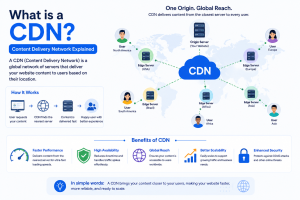
CDN stands for Content Delivery Network; you’ll also see it called a Content Distribution Network. In basic networking terms, the CDN full form in networking simply refers to a group of servers positioned at different geographic points that all work together to deliver the same content to users based on their location.
Here’s why that matters. Say your website’s server is based in Mumbai, but your visitors are logging in from the UK or Singapore. Without a CDN, every single request has to travel all the way from that visitor’s location to your Mumbai server and back, and that distance adds real delay. That request doesn’t have to go all the way thanks to CDN content delivery. Instead, it connects to the nearest CDN network that has your content already prepared to serve, so the visitor gets a fast response without having to go all the way back to Mumbai.
Referring back to the grocery shop analogies, a CDN network is a collection of these “local shops”, spread across many different locations around the world. Each one is called an edge server, and technically these locations are known as PoPs, short for Points of Presence.
The word “edge” here refers to the boundary of the network — the point closest to the actual user or device, rather than the core of the network where the main server sits. Instead of every visitor being sent all the way to your one main server at the core, they get served by whichever edge server happens to be nearest to them, right at that boundary.
The basic flow is origin server ? edge servers ? end user. Your origin server is the main warehouse at the core of your website, the one source of truth for the content of your site. Edge servers sit between the core and your real visitors, and they hold copies of your content closer to where people are actually browsing from.
This is where caching comes into the picture. Caching, as covered earlier in this series, means storing a copy of something so it does not need to be fetched fresh every time. A CDN applies this exact idea at every one of its edge locations.
Here’s what actually happens when someone visits your site, step by step:
Traditionally, this worked best for static content — images, CSS, and JavaScript files that do not change often. Increasingly, CDNs are also able to cache certain dynamic content, though how much of that gets cached depends on the specific CDN and how the website is configured.
The result is straightforward: instead of every single visitor’s request travelling all the way to your main server and back, most requests get handled by a nearby edge server, the same way most of your daily needs get handled by the local shop instead of a trip across town to the mall.
By now, you know how a CDN moves content closer to the visitor. The real question is what that actually gets you once it is set up and running.
This is the benefit most people notice first, and it makes sense why. Every piece of content served from a nearby edge server, instead of travelling all the way to the origin and back, cuts out a real chunk of the time it takes for a page to actually appear on screen. A visitor does not care why a page loads fast, only that it does, and this is the reason it does.
Without a CDN, your origin server has to answer every single request itself, regardless of how many people are asking for the same image or script at the exact same time. Instead, a CDN can serve images, CSS, and JavaScript files from the cache instead of requesting them from the main server every time. This translates into considerably less communication with the origin server, and it improves its overall efficiency – your main server is not constantly working overtime just to serve the same files over and over.
As the content is spread across many edge servers instead of just one location, the whole system is not dependent on a single server being healthy. That’s important at the exact moment it matters – during peak sales, festival seasons, or an unexpected traffic spike that would otherwise bring one central server to its knees. A CDN helps by distributing those requests across multiple edge locations, instead of dumping it all on the origin. It plays a part in reducing the risk of the site crashing or failing and keeps it running smoothly even under high load.
Search engines consider page speed as a factor in determining how to rank a page. If the page is faster, it usually means a better experience for the person searching. Here, the speed improvement of a CDN really helps, but it’s worth being honest about it: using a CDN alone won’t guarantee higher rankings. It’s one piece of a much larger puzzle, not a shortcut to replace everything else that goes into ranking well.
A CDN sits between your visitors and your actual server, and that position turns out to be useful for more than just speed. Many CDN providers include security features that filter out malicious traffic and absorb large-scale attacks right at the edge, before any of it ever reaches your origin infrastructure. So a CDN is not only about making things faster; it also becomes an extra layer of protection standing between the open internet and your actual server.
A few real-world examples of where all this shows up in practice:
A product page with hundreds of images
An e-commerce site with a busy product catalogue sends the same set of images to every visitor. Without a CDN, every single visitor pulls those images from the origin server directly. With a CDN, an edge server caches those images once, and everyone in that region gets served from that cached copy instead.
A video streaming platform
Video files are large, and users are spread across many locations. A CDN lets content be delivered from an edge server close to each viewer, rather than every stream travelling back to one central server.
A regular business website during a traffic spike:
A sudden surge in visitors, say during a festival sale, would normally hit the origin server hard all at once. With a CDN handling the cached content, much of that load gets absorbed at the edge instead of overwhelming the origin.
It is worth being clear here, since this is where a lot of people get the wrong idea: a CDN is not something only built for Netflix-sized platforms. A normal business website with images, CSS files, JavaScript, fonts, and other static resources benefits from the same setup a massive streaming platform uses.
The CDN handles delivering those static resources from the edge, while the origin server focuses on the parts of the site that genuinely need to be generated fresh each time, like a login page or a checkout process. A CDN is not a special kind of website; it is simply an infrastructure layer that helps deliver a website’s content more efficiently, whatever size that website happens to be.
Both cache and CDN technologies work with cached versions of content. However, each solves slightly different problems: a cache ensures that the same content is not generated/obtained many times, while CDN technology distributes cached content in geographically distributed edge servers.
Now imagine you have a data centre in Mumbai. Your website uses cached data with a cache, so processing is fast, and when a user makes a request, it does not have to start from the beginning. But with a CDN, if your customers are located in another country, the distance between the visitor and the server is usually much longer.
A CDN introduces distributed edge locations, allowing requests an easier time getting through. Geographically distributed edge servers which allow users to get that content from somewhere closer to them.
| Factor | Caching | CDN |
| Storage type | Local storage: one machine | Distributed network: many locations |
| Delivery point | Single point of delivery | Multiple edge locations |
| Main purpose | Avoid repeatedly retrieving the same content from scratch. | Deliver content efficiently from a location closer to the visitor. |
| Geographic distribution | Not necessarily distributed | Built around distributed edge locations |
| Can they work together? | Yes | Yes |
| Best for | Speeding up repeat requests to the same server | Speeding up requests from visitors far from the origin |
For readers coming from more of a dev or system-design background, one architecture detail worth adding to what we already covered: a full request path often looks like client ? CDN ? load balancer ? origin server, with the load balancer sitting between the CDN and the origin whenever there is more than one origin server sharing the load. The CDN still handles anything already cached, the same way covered earlier; the load balancer only comes into play for the requests that actually need to reach the origin.
The genuinely new piece here is what “CDN in networking” actually means at the network layer. It comes down to a routing decision: instead of every request travelling to one central point, a CDN introduces multiple distributed points, closer to the network’s edge, where a request can be answered. The network is set up to direct a request to the nearest or best-positioned point, rather than forcing every single request down the same long path to one origin, no matter where that request is coming from.
There are many CDN providers out there today, ranging from dedicated CDN platforms to major cloud providers who offer their own CDN services alongside their broader infrastructure. Choosing between them usually comes down to a few practical factors: where your visitors are located, how much traffic your site actually gets, what security features you need, and how well the CDN fits with whatever hosting you are already running.
A few worth knowing by name, since readers researching a specific platform often want a direct answer:
When people say “Amazon’s CDN”, they generally mean Amazon CloudFront, AWS’s content delivery service, built around a global network of edge locations. It can work with AWS services as the origin or with other origins depending on the setup.
Google’s own content delivery service is built to work directly with Google Cloud infrastructure, caching and serving content via Google’s network.
Microsoft has content delivery services of its own within the Azure ecosystem. The idea is the same as the others: deliver content through Microsoft’s infrastructure so users get it efficiently. The exact service and configuration depend on what your application needs.
If your website mainly serves visitors within India, location becomes the deciding factor more than a provider’s total global footprint.
A CDN with dozens of locations worldwide is not necessarily useful if very few of them are actually near your real audience. Worth checking specifically for edge coverage in India and the regions where your visitors actually are, rather than going by advertised global numbers alone.
CDN cost varies depending on a few things: how much data gets transferred, the number of requests, which regions you need covered, and any additional security features included. Some providers charge pay-as-you-go, based on bandwidth used; others offer tiered plans depending on your traffic and feature needs.
There is no single fixed price; a small site with modest traffic will see very different costs than a large platform serving heavy video or image traffic.
None of these providers replace the need for solid hosting underneath your website in the first place: a CDN works alongside your hosting infrastructure, not instead of it, caching and delivering content while your actual server continues handling the parts of your site that need to be generated fresh. You can explore host.co.in plans, where each plan is powered by indian based with enterprise-grade security
What does CDN stand for?
CDN stands for Content Delivery Network: a system of distributed servers that store and provide website data from servers located closer to your customers, rather than all requests being sent to one single server.
How does a CDN improve website speed?
Your content will be cached on edge servers located in various geographical locations, such that the request made by the user will be delivered from the closest server rather than your origin server. The less distance the request has to cover, the faster the loading of the web page becomes.
What is the difference between a CDN and a web host?
Web hosting is the place where your website actually resides and the server itself. The CDN will work with your web hosting, as it delivers your content from edge servers, yet it does not eliminate the importance of having good web hosting underneath. It is necessary to have web hosting infrastructure in place anyway.
Do small websites need a CDN?
This is not always the case. A small website with low traffic and users limited to a single region does not have enough reasons to use one. However, once you begin serving lots of static content or when you experience sudden increases in traffic and users from various locations, then CDN usage makes sense.
What are some examples of CDN providers?
Some of the CDN providers are Amazon CloudFront, Google Cloud CDN, and Azure CDN, offered by Microsoft. Each depends on traffic volume, geographical location of users, and budget considerations.
A CDN provides an additional distributed layer of separation between your customers and your origin server. Rather than having each customer request the content from a single central location, a CDN makes copies of content that get accessed frequently at several edge locations and serves the content from the nearest edge location for whoever is requesting it.
Worth remembering from earlier in this guide: a CDN does not replace caching; it is built on top of it, applying that same idea across many locations instead of just one. Your website still needs proper hosting behind it either way. Whichever setup fits your traffic and audience, host.co.in’s hosting and cloud plans give you the infrastructure a CDN sits on top of, so speed and reliability start from a solid foundation rather than being patched on afterward.

Prathamesh Suryawanshi