Imagine two factories that both can make cars, but they do it differently.
Factory A is a flexible general-purpose plant. It can jump from cars to trucks and buses, retool quickly, and take custom orders. It’s good at a lot of things, but it’s not optimised for any one product.
Factory B is a single-model assembly line, built for one model of car. It’s not easy to switch to trucks or buses, but for that one model it’s faster, cheaper per unit, and wildly efficient at scale.
In AI hardware, the same trade-off exists between two different chips.
The GPU is Factory A. It’s a programmable powerhouse that can be deployed for a variety of workloads – AI training, inference, graphics, and scientific computing – and across multiple frameworks and clouds. It’s strong on flexibility; it wasn’t built to do just one job.
Factory B is the TPU, or Tensor Processing Unit. Google made it as a custom chip, optimised specifically for the tensor math behind neural networks, especially large, steady workloads run at scale. It gives up the flexibility of the GPU so that it can do that one job faster and more efficiently than a general-purpose chip ever could.
GPU stands for Graphics Processing Unit. This powerful processor manages a large number of calculations at once by dividing larger jobs into smaller pieces and processing each independently, which is exactly why GPUs for AI became so important. Training a model is really just this: working through millions of data points, running complex calculations, and repeating that process until the model learns – work a GPU is built to do at scale.
TPU, short for Tensor Processing Unit, is a chip built specifically to accelerate machine learning workloads, particularly the tensor math that sits underneath every neural network. Where a GPU stays general-purpose, capable of AI training, graphics, scientific computing, and more, a TPU gives up that flexibility in exchange for specialisation; it is built as a dedicated accelerator for machine learning, not a general-purpose processor.
That focus is what lets it run its core operations- matrix multiplications, tensor operations, and the actual arithmetic a model is built from – faster and more efficiently than a general-purpose chip ever could, provided the workload is large and steady enough to make that trade-off worth it.
| Factors | GPU | TPU |
| Design | General-purpose, programmable | Purpose-built ASIC for tensor and matrix operations |
| Compute approach | Massively parallel CUDA cores plus specialised Tensor Cores for matrix/tensor operations | Systolic array (grid of multiply-accumulate units) |
| Flexibility | Runs AI, graphics, scientific computing, more | Runs neural network tensor operations |
| Precision | FP32, FP16, BF16, FP8, workload chooses | Optimised for bfloat16, though workloads can use other formats |
| Software ecosystem | CUDA, PyTorch, TensorFlow and a broad range of frameworks | TensorFlow, JAX via XLA: narrower, Google-first |
| Availability | Cloud, on-premises, local systems, and multiple providers | Primarily available through Google Cloud |
Once you know what a TPU actually is, the natural next question is how it stacks up against a GPU directly. The two are often talked about as competitors, but that framing is not quite right; they are built on different premises entirely – one general-purpose, one purpose-built – and that difference shows up in six distinct ways.
A GPU started life as a graphics chip, built to render images, and only later grew into general-purpose compute, a shift NVIDIA pushed deliberately, years before anyone was training neural networks on it. Its architecture just happened to suit AI work extraordinarily well once that moment arrived.
A TPU started the other way round, designed by Google from the ground up for one purpose only: the tensor math behind neural networks, and nothing else. The GPU is the flexible plant that learned to build this particular car well. The TPU is the assembly line built for this car from day one.
A GPU is programmable. It runs whatever instructions a framework sends it, which is why the same GPU can handle AI training one moment, render a game the next, and run a scientific simulation after that. A TPU is an ASIC, an application-specific integrated circuit, meaning its hardware is fixed around one job: dense matrix multiplication for neural networks. It cannot be repurposed the way a GPU can. That rigidity is not a flaw; it is the entire design decision, the same narrowing that lets a TPU do its dedicated job faster than a chip built to do many things adequately.
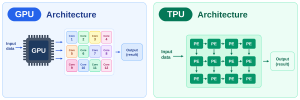
The two chips solve the same problem in genuinely different ways. A GPU uses thousands of small, independent cores, CUDA cores alongside dedicated Tensor Cores, each capable of running its own instruction, which is what gives it the flexibility to handle varied, dynamic workloads.
A TPU uses a systolic array instead, a tightly arranged grid of multiply-accumulate units where data flows through in a wave, each unit passing its result directly to the next. Because intermediate values rarely need to leave the chip, this design cuts down heavily on memory reads.
The trade-off is exactly what you would expect: a systolic array is extremely good at dense matrix math and comparatively rigid at everything else, whereas a GPU’s independent cores stay adaptable to whatever gets thrown at them.
Both chips lean on high-bandwidth memory, but they treat precision differently. A GPU supports a wide range of formats, FP32, FP16, BF16, and FP8, and lets the workload choose the trade-off between accuracy and speed.
A TPU is built around bfloat16 as its primary format, trading some numerical range for significantly better throughput per watt, and most TPU workloads lean on it heavily, though the chip isn’t limited to running only that one format.
A GPU sits inside the broadest AI software ecosystem that exists. CUDA, PyTorch, TensorFlow, and most frameworks run on NVIDIA GPUs with little to no extra translation required, which is a large part of why GPUs remain the default choice for most teams. A TPU is tied closely to Google’s own stack, TensorFlow and JAX, compiled through XLA, and while PyTorch support exists, it is not the same native, first-class experience a GPU offers. Choosing a TPU means committing to that narrower software path in exchange for the performance gain it offers within it.
A GPU runs almost anywhere, in the cloud, on-premises, or on a local desktop, across every major cloud provider and a huge range of hardware. A TPU is available exclusively through Google Cloud; there is no on-premises TPU, and no other provider offers one. This is the most practical difference of the six for anyone actually deciding between them: a GPU is a choice you can make almost anywhere; a TPU is a choice you can only make inside Google’s own ecosystem.
Say an e-commerce company runs an AI chatbot, and a million customers are asking it things like “suggest a laptop for gaming under ?80,000” at the same time. Answering any one of those requests is not one calculation; it is a request built on customer data multiplied against product data, matrices of numbers being worked through to produce a recommendation score. That is the one calculation this whole section follows, first through a GPU, then through a TPU.
Picture the GPU as a large room full of flexible workers. A customer’s request comes in, and rather than one worker handling the whole thing, the GPU splits the calculation behind it into smaller pieces and hands them to different processing units, working on them at the same time. Dedicated Tensor Cores step in specifically for the matrix multiplication a recommendation depends on, while the general-purpose cores around them stay free for whatever else the workload needs.
Because those workers are programmable, this is not a one-trick pony; the same GPU serving this customer’s laptop recommendation can just as easily be handling an entirely different kind of AI request or a completely different workload moments later. That programmability is where a GPU’s flexibility actually comes from.
Now suppose the company decides its main business really is this: running enormous AI models continuously, all day, for millions of requests like this one. Instead of a room of flexible workers, they build a specialised processing factory instead, a TPU, and here is the part worth being precise about: the TPU is not special because a million customers are asking it something.
A GPU can serve a million customers too. The TPU is special because its hardware is built specifically around the mathematical pattern sitting underneath every one of those requests: customer data multiplied against product data, worked through as large matrices rather than individual records.
At the centre of that hardware sits a systolic array, a grid of processing elements arranged to do exactly this: take in large blocks of numbers and push them through specialised matrix-processing hardware, over and over.
This is where a GPU vs TPU comparison stops being about flexibility versus specialisation and becomes about how the numbers actually move. On the GPU, each processing unit pulls its slice of the customer’s request from memory, works through its part of the calculation, and writes the result back, repeated across many units running in parallel.
On the TPU, the customer data matrix and the product data feed straight into the grid of processing elements, and the multiply-and-add operations happen as that data flows directly through, each element passing its result on to the next rather than round-tripping back to memory first.
That is most of what makes GPUs and TPUs behave so differently on the exact same recommendation calculation; one keeps shuttling data back and forth, the other keeps it moving continuously through hardware built for nothing else.
Both chips can serve a million customers. Both can run the same customer-data-times-product-data calculation behind a recommendation. The TPU’s advantage was never about scale; it was always about the shape of the work: hardware built around one recurring mathematical pattern, run continuously, versus hardware built to stay useful across whatever pattern shows up next.
Is TPU faster than GPU? Then, it comes down to exactly that: if the workload is this same recommendation calculation, repeated at a massive, steady scale, the TPU’s specialisation pays off. If the workload keeps changing shape, from a chatbot one moment to image processing the next, a GPU’s flexibility is what actually keeps up, and that’s what the next section covers in depth
The honest answer is that neither chip is faster in general, only faster for a particular kind of workload run under particular conditions. This section breaks that down properly rather than settling for a single verdict, because whether a TPU is faster than a GPU is really five different questions wearing one.
For large, steady training runs, where the same tensor operations repeat continuously across enormous batches of data, a TPU’s systolic array plays directly to its strength, and Google’s own TPU pods are built specifically to scale that advantage across thousands of chips working together. A GPU can train the same model, and for most teams outside Google’s own infrastructure, it remains the default choice, backed by the broader software ecosystem covered earlier. Where a TPU tends to pull ahead is specifically in performance per watt on this kind of steady, large-scale training, not necessarily in raw speed on every training job regardless of size.
Inference, the actual moment the chatbot generates an answer for one of those million customer requests, favours whichever chip is shaped to match how the requests actually arrive. A TPU handles inference well when requests are steady, high-volume, and uniform in shape, the same recommendation calculation running again and again with minor variation.
A GPU tends to handle inference better when requests are irregular, bursty, or varied in size and type, since its programmable cores adapt to that variation far more comfortably than a fixed systolic array does. Neither wins inference outright; it depends on whether the traffic looks steady or unpredictable.
Large language models complicate the comparison further, because an LLM’s workload is not purely one shape. Training a large model leans heavily into the kind of steady, matrix-heavy work a TPU is built for.
Serving that model afterward, especially with varying prompt lengths, different context sizes, and unpredictable request patterns from real users, leans back toward a GPU’s flexibility. This is part of why most LLM deployments outside Google still run primarily on GPUs, not because TPUs are incapable, but because the full lifecycle of an LLM, training and serving both, rarely stays inside the narrow, uniform shape a TPU performs best on.
The same distinction that separated a CPU from a GPU applies again here, just one level up. A GPU’s flexibility often gives it an edge on latency for a single, irregular request, since its independent cores are not locked into a fixed data flow the way a systolic array is.
A TPU tends to win on throughput instead, total requests processed over time, once the workload is large and steady enough for its systolic array to run at full stride without interruption. Judging one chip faster than the other without specifying which of these two you are actually measuring is comparing the wrong number to the wrong question.
Every comparison above comes back to the same point. A TPU is fastest when the workload looks like the recommendation calculation running continuously at scale, large, steady, tensor-heavy, and uniform.
A GPU is fastest when the workload keeps changing shape, with varied request sizes, mixed AI and non-AI tasks, and unpredictable traffic. Neither chip is faster in the abstract, and any answer to GPU vs TPU that skips naming the workload first is not really answering the question at all.
Cost is where GPU vs TPU decisions often get made in practice, even when performance numbers say otherwise, so this is worth being precise about rather than reaching for a single “TPU is cheaper” or “GPU is cheaper” verdict, because neither holds up on its own.
TPUs are primarily available through Google Cloud, while GPUs are offered across a much wider range of cloud providers and on-premises environments.
A GPU is available far more broadly, across multiple cloud providers, on-premises deployments, and local hardware, which puts real competitive pressure on price and gives a buyer genuine room to compare.
For an Indian business, this difference carries an extra layer most global pricing comparisons skip entirely: most global cloud GPU and TPU services bill in dollars, which means every invoice carries forex fluctuation on top of the underlying compute cost. A GPU server rented from an Indian provider and billed directly in rupees removes that exposure altogether; the cost stays predictable regardless of what the exchange rate does that month.
For large, steady training runs, a TPU’s efficiency per operation can translate into a lower cost for that specific kind of job. A GPU can train the same model and remains the far more common choice for most businesses, since broader availability and provider choice frequently offset any raw efficiency gap on paper.
Training cost genuinely favours whichever chip the workload is shaped for; this is not a case where one chip wins on cost regardless of the job, and for a business budgeting in rupees, a locally hosted GPU keeps that training cost fixed and predictable in a way a dollar-billed service simply cannot.
Inference cost follows the same pattern: steady, high-volume, uniform inference plays to specialised hardware’s strength, while irregular or varied inference workloads tend to run more cost-effectively on flexible, general-purpose hardware instead, since idle or underused specialised capacity does not actually save money; it just sits there.
This is the same logic that runs through the NVIDIA GPU for AI training discussion earlier in this guide: hardware only pays for itself when the workload actually matches what it was built for.
This is really asking how much useful work a business gets for every rupee it spends, not just how low the sticker price looks upfront. Specialised hardware can post a strong return on the narrow, steady workloads it is designed around.
Flexible, widely available hardware tends to offer a better return once a workload is varied, unpredictable, or needs to run somewhere other than one locked-in provider. Judging this without naming the workload first produces a meaningless number either way, regardless of which currency it is measured in.
Beyond the upfront cost, power draw is a real, ongoing operating expense, and one that shows up on every monthly bill, whether the hardware is being used efficiently or not. Specialised architecture built around one recurring operation can post strong performance-per-watt numbers on paper, particularly for large, continuous workloads.
A GPU draws real power too, and at scale that adds up meaningfully, but its far broader deployment options mean power efficiency can often be managed through provider and workload placement choices that a single-vendor chip simply does not offer, and for a business paying in rupees, that flexibility translates directly into a running cost it can actually plan around.
|
Framework / Tool |
GPU | TPU |
| CUDA | Native, deep driver and library support | Not applicable, not used on TPU |
| XLA | Optional, available but not the default path | Native compiler, required for TPU execution |
| TensorFlow | Fully supported | Fully supported, first-class |
| JAX | Supported | Fully supported, first-class |
| PyTorch | Native, no translation layer needed | Supported via PyTorch/XLA, a bridge library |
The one thing that actually matters: if your team already works in PyTorch, a GPU stays the path of least resistance. If the workload lives in TensorFlow or JAX and runs large and steady, a TPU’s ecosystem fit is genuinely strong, but know upfront that moving between the two later is real work, not a setting you flip.
Scaling a single chip into hundreds is where a GPU vs TPU decision stops being about the chip itself and starts being about the infrastructure built around it, how the chips connect, and where they can actually run.
A single GPU eventually runs into the same wall every chip does; some workloads simply do not fit on one card. Multi-GPU scaling is how a GPU deployment gets around that, connecting several GPUs together so they can share a large training job or serve high-throughput inference as one coordinated system, rather than each card working in isolation.
This is the interconnect technology that actually makes multi-GPU scaling work well. NVLink is NVIDIA’s direct GPU-to-GPU connection, built specifically to move data between cards far faster than the standard PCIe slot they sit in ever could. On its own, NVLink connects GPUs in pairs; NVSwitch is what extends that into a full fabric, letting every GPU in a server talk to every other GPU at full speed, at the same time, without one connection slowing another down. Together, this is what lets several physically separate GPUs behave, for a large training job, almost like one much larger one.
A TPU scales differently. Google connects large numbers of TPU chips into what it calls a pod, and within that pod, a business can rent a slice, a smaller, dedicated portion of the pod sized to the workload. Chips within a slice communicate over Google’s own high-speed interconnect, and slices themselves can be combined for even larger training runs. The mechanism differs from NVLink and NVSwitch, but “the underlying goal is the same: making many chips behave as one large, coordinated system.”
This is where the two paths diverge sharply, not just technically. A GPU can be deployed almost anywhere, in the cloud, in a business’s own data centre, or on a single local machine, giving a business full control over where its hardware physically sits. A TPU has no on-premises option at all; it exists only inside Google Cloud, which means choosing a TPU also means choosing to run entirely inside one provider’s infrastructure, with no path to bringing that workload in-house later. For an Indian business already weighing the data residency and latency considerations covered earlier in this guide, that on-premises option is not a small detail; it is the only path that keeps a workload entirely under the business’s own control and inside its own jurisdiction.
Put together, this is the real difference behind GPU vs TPU scalability: a GPU’s scaling tools, NVLink, NVSwitch, and broad provider choice give a business room to grow a deployment in whatever direction and location suits it. A TPU’s scaling, Pods and slices, is genuinely powerful at Google’s own scale, but it comes locked to one provider from the start. For a business weighing deployment options, that lock-in is often the deciding factor long before raw performance numbers even enter the conversation.
|
Workload |
Better Fit | Why |
| LLM training | Depends on scale | GPU for flexible, smaller-scale training; TPU pulls ahead at large, steady, hyperscale runs |
| LLM inference | Depends on traffic shape | Steady, uniform traffic favours TPU; irregular, bursty traffic favours GPU |
| Fine-tuning | GPU, generally | LoRA/QLoRA tooling is built around PyTorch first, where GPU support is native |
| Generative AI | GPU | Diffusion and generation tooling is overwhelmingly GPU-first |
| Computer vision | Depends on scale | Uniform, large-scale pipelines suit TPU; mixed input sizes and stages suit GPU |
| Recommendation systems | TPU, at real scale | Built with dedicated hardware (SparseCore) for exactly this, huge embedding tables |
Everything in this guide has been building toward one practical question: for the specific job in front of you, which chip actually wins? The pattern below leans GPU more often than not, and that is worth saying plainly rather than leaving it unexplained; it comes down to TPU’s single-provider availability and a PyTorch-first tooling world, both covered earlier in this guide, not a lack of capability. TPU still wins outright where the workload is large, steady, and already living inside Google’s own ecosystem, and the table below shows exactly where that is.
No, and not for a reason that has anything to do with performance. A TPU is designed primarily for tensor and matrix operations used in machine learning, rather than general-purpose computing, so any system that also needs graphics rendering, scientific computing, or general-purpose compute alongside its AI workload still needs a GPU, regardless of how well the TPU handles the AI portion.
A TPU can outperform a GPU on the narrow set of workloads this guide has already covered – large-scale training, high-volume inference, recommendation systems at scale – but it was never built to be a general-purpose replacement, only a specialist for one part of the job.
GPU stands for Graphics Processing Unit, and TPU stands for Tensor Processing Unit. Both are processors built for parallel computation, but a GPU is general-purpose and programmable, while a TPU is a specialised chip built specifically for the tensor and matrix operations behind neural networks.
Not always; it depends on the workload and provider. A TPU can offer strong performance per rupee on large, steady, tensor-heavy workloads, since its architecture is built specifically for that shape of work. A GPU tends to offer better value once a workload is irregular or needs to run outside a single provider’s cloud, since a TPU is available only through Google, with no competing vendors to shop between.
Mainly availability and ecosystem, both covered earlier in this guide: a GPU runs almost anywhere, while a TPU exists only inside Google Cloud, and most teams already build on PyTorch, which runs natively on GPU.
Neither is better in general; GPU vs TPU comes down to the specific workload. A GPU tends to win for mixed, irregular, or PyTorch-native work and for anything needing graphics or a broad deployment choice. A TPU tends to win for large, steady, tensor-heavy training or inference already living inside Google’s ecosystem, recommendation systems at a real scale being one of its strongest fits.
No. A TPU is available exclusively through Google Cloud, with no on-premises option and no other provider offering one. This single-provider availability is one of the most practical differences in any GPU vs TPU decision, and it is often the deciding factor before performance or cost even enter the conversation.
A GPU vs TPU decision was never really about which chip is faster; it comes down to shape: a GPU stays flexible enough to run almost anything thrown at it- CUDA, PyTorch, graphics, mixed workloads – and is deployed almost anywhere. A TPU gives that flexibility up entirely, purpose-built hardware for one job: tensor and matrix operations at large, steady scale, available only inside Google’s own ecosystem.
Neither wins outright. What is a TPU built for, and where does a GPU still win, comes down to the same handful of things covered throughout this guide: workload type, framework, training versus inference, budget, and how much deployment freedom the business actually needs. For most teams, that ecosystem breadth and provider choice keep a GPU as the default, and GPUs and TPUs end up working alongside each other far more often than one fully replacing the other.
For businesses evaluating NVIDIA GPUs for AI deployments, factors such as workload requirements, scalability and deployment flexibility can help determine the right setup. NVIDIA options such as the NVIDIA H100 GPU and NVIDIA H200 GPU can support demanding AI workloads, while technologies such as NVLink and NVSwitch enable high-performance multi-GPU configurations. Where GPU infrastructure is required, host.co.in provides flexible deployment options for workloads such as AI training, inference and other compute-intensive applications. At the same time, TPUs can remain a suitable choice when their architecture and ecosystem align more closely with the specific workload.

Madhavi Potdar