Imagine you run a city. You have one brilliant mayor and an army of 5,000 identical workers.
The mayor can handle anything: sign permits, negotiate deals, solve complex legal problems, switch between tasks instantly, and make judgment calls. But there’s only one of them, so it’s limited by a heavy workload.
The army isn’t great at complex decisions. Each worker can only do simple, repetitive jobs: lay bricks, carry boxes, and paint walls. But because there are so many, they can finish massive jobs in parallel, even in high workload, without any dependence on 1 person.
In technical terms,
The CPU (Central Processing Unit) is the mayor. It’s for more complex, sequential, logic-based tasks: running your OS, processing web requests, running business logic, managing databases, and coordinating all the rest.
The GPU (Graphics Processing Unit) is the army. especially made for massively parallel, repetitive math: rendering frames, training neural networks, processing large matrices, and crunching huge datasets all at once.
In this guide, you will learn the CPU and GPU full form, the CPU vs GPU difference, their architecture and compatibility, etc.
A CPU (central processing unit) is your computer’s brain. It handles day-to-day tasks like running apps, managing files, and processing requests. But it does it all one thing at a time.
A CPU has only a handful of cores, but each one is built to be extremely capable on its own, deep and fast, and able to jump between very different kinds of tasks without losing the thread. That versatility is exactly what makes it well suited to logic-heavy work and poorly suited to AI’s kind of work. A model does not need one core making a thousand different decisions in sequence; it needs the same simple operation performed millions of times over, and that is not a CPU’s job. That gap is precisely why a GPU exists.
GPU can do thousands of things at once. Things like AI training, machine learning, and handling high workloads that a regular CPU would not handle. GPUs are incredibly efficient in training AI applications where the amount of data to be processed is too much for normal processing.
A GPU has thousands of smaller cores rather than a handful of powerful ones, and every core does the same simple operation at once, just on a different slice of the data. That is what makes it well suited to AI work: training and running a model is really just the same multiply-add operation, repeated millions of times over, and a GPU’s whole architecture exists to do exactly that, at scale, in parallel. For smaller projects or workloads that do not require high-end hardware, a cheap GPU server can provide access to GPU computing without the need to purchase a dedicated physical machine.
|
Factors |
CPU |
GPU |
|
Full form |
Central Processing Unit |
Graphics Processing Unit |
|
Core count |
Few cores, each highly capable |
Thousands of smaller cores |
|
Built for |
Complex, sequential, logic-heavy tasks |
Massively parallel, repetitive tasks |
|
Typical work |
Running the OS, application logic, coordinating the system |
Rendering frames, training models, matrix calculations |
|
Strength |
Judgement and decision-making, one step after another |
Doing the same operation across huge amounts of data at once |
|
Weakness |
Cannot scale across thousands of identical tasks efficiently |
Not suited to complex, sequential logic |
The core gpu and cpu difference are not speed; it is shape. A CPU is built to handle a small number of complex, sequential tasks, where each step depends on the result of the one before it and a decision needs to be made before the next step can begin.
A GPU is built to handle a huge number of simple, identical tasks at the same time, where nothing depends on judgment and the same operation is simply repeated across a large volume of data. A CPU does one thing very capably; a GPU does the same thing many thousands of times at once.
No, they are generally suited to different kinds of work, and a computer typically uses both together rather than choosing one over the other. The CPU handles the operating system, application logic, and coordination between components, work that genuinely needs a single capable decision-maker.
The GPU handles workloads that split apart cleanly into many identical pieces, such as training a neural network or rendering graphics. AI work in particular depends on this division, since a CPU alone cannot process the scale of repeated calculation that training or running a model requires, and a GPU alone cannot manage the sequential logic that runs the rest of the system.
It comes down to depth versus count. A CPU has a handful of powerful cores built for complex, sequential logic. A GPU has thousands of simpler cores built to run the same operation across massive data in parallel. That one trade-off is the root of every other difference between the two.
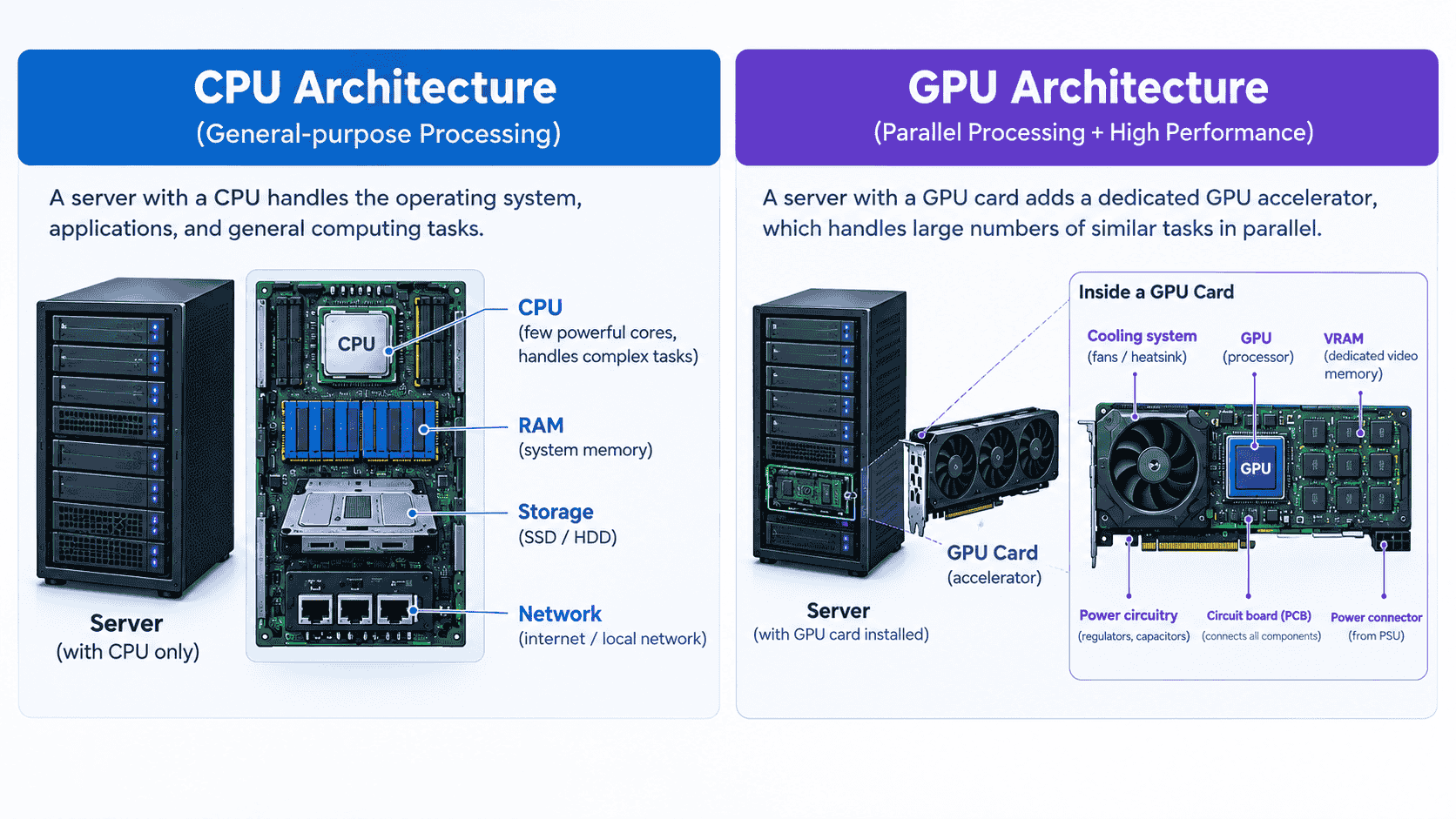
A CPU typically has a small number of cores, usually somewhere between four and sixty-four in modern processors. Each of those cores is a fully capable processing unit on its own, built to execute a wide range of instructions, jump between unrelated tasks, and carry out complex logic without needing help from the others. Depth is the whole design philosophy here: fewer cores, but each one significantly more capable per core than anything on a GPU.
A GPU flips that completely. Instead of a handful of powerful cores, it packs in thousands of much simpler processing units, sometimes referred to as CUDA cores or stream processors depending on the vendor.
Each individual unit is far less capable than a single CPU core; it can only carry out simple, repetitive operations, and it cannot manage complex branching logic on its own. What it lacks in individual capability, it makes up for entirely in number.
This is the architectural root of everything else that follows in this section. A CPU is a small number of generalists, each strong enough to handle a task alone. A GPU is a vast number of specialists, each weak alone but overwhelming in parallel.
Neither design is better in the abstract; they are simply built for opposite shapes of work, and that trade-off between depth and count is what every other difference between the two- sequencing, throughput, and memory- ultimately comes back to.
Sequential processing means working through a series of steps one after another, where each step depends on the result of the one before it. A CPU is built around exactly this pattern. If step three needs the answer from step two, the CPU waits, computes step two, then moves on. It cannot skip ahead or guess at an outcome it does not yet have. This is precisely why a CPU is suited to running an operating system, executing business logic, or making a decision that branches based on a condition; each of those tasks is inherently a chain, and chains have to be worked through in order.
Parallel processing means splitting a task into many independent pieces and working on all of them at the same time, because none of the pieces depend on each other’s outcome. A GPU is built around exactly this pattern instead.
Multiplying two large matrices does not require the answer to one multiplication before starting the next; every individual multiply-add operation is independent of every other one happening alongside it. So a GPU simply hands each piece to a different core and lets them all run simultaneously, rather than working through them one at a time the way a CPU would.
The distinction is not about which approach is faster in general; it is about which approach fits the shape of the task. A sequential task forced onto parallel hardware gains nothing, because the dependency between steps still has to be respected, and most of those thousands of cores sit idle waiting their turn.
A parallel task forced onto sequential hardware becomes painfully slow, because a CPU has to work through millions of independent operations one after another when they could have all been happening at once. This is the real reason training a neural network on a CPU is impractical at scale: the workload is fundamentally parallel, and sequential hardware is the wrong shape for it, no matter how fast that hardware runs.
Latency is how long a single task takes from start to finish. Throughput is how much total work gets done across a given period of time. These are not the same thing, and the difference between them is exactly what separates a CPU from a GPU.
A CPU is optimised for low latency. When one task arrives, a CPU core is built to finish that single task as fast as possible, using high clock speeds, deep pipelines, and branch prediction to keep it moving without delay.
This matters enormously for the kind of work a CPU does, running the operating system, responding to a user’s click, and handling a single request, because in each of those cases, someone or something is waiting on that one result, and speed on that one task is the entire point.
A GPU is optimised for high throughput instead, often at the cost of latency on any single piece of work. Any one core on a GPU is comparatively slow at finishing an individual operation, but that barely matters, because thousands of cores are all working at once.
The GPU is not trying to finish one multiply-add as fast as physically possible; it is trying to finish millions of them across the same stretch of time, and it accepts a slower per-core result in exchange for far greater total output.
This is why a GPU with a lower per-core clock speed can still vastly outperform a CPU on an AI workload, and why a CPU with a much higher clock speed still cannot compete with a GPU on the same job. When people debate over GPU vs CPU, it is always about which processor is being measured on the right axis: latency for the CPU, throughput for the GPU, and a workload only performs well when it is matched to the axis its hardware is actually built for.
A CPU relies heavily on cache, a small amount of extremely fast memory sitting directly on the chip, arranged in layers, typically L1, L2, and L3, each one larger and slightly slower than the last.
The purpose of this cache is to keep the data a CPU core is currently working on as close to that core as physically possible, because a CPU’s sequential work depends on retrieving the right piece of data instantly, with no delay, before it can move to the next step in the chain. Cache is small by design, often only a few megabytes in total, because it is built for speed and proximity, not volume.
A GPU takes a different approach entirely, relying on high-bandwidth memory such as GDDR or HBM, sitting alongside the chip rather than layered within it. This memory holds far more data than a CPU’s cache ever could, often tens or even hundreds of gigabytes, because a GPU is not serving one core’s immediate need; it is feeding thousands of cores, all processing different slices of the same job simultaneously. What matters here is not how close the memory sits, but how much data can move at once, which is exactly the memory bandwidth already covered earlier in this guide.
The underlying logic is the same one running through every difference in this section. A CPU needs a small amount of data available instantly, because one core is working through a dependent chain of steps.
A GPU needs a huge amount of data available continuously, because thousands of cores are all drawing from the same pool at the same time. Small and fast versus large and wide is not an accident of engineering; it is the direct consequence of sequential work versus parallel work.
No, and this is one of the more common misunderstandings about the two. Clock speed measures how many cycles a single core completes per second, and on that measure, CPUs almost always win outright, typically running at three to five gigahertz, while GPU cores often run slower, sometimes closer to one and a half to two gigahertz. If clock speed alone decided performance, a CPU would beat a GPU at everything, and that is clearly not what happens in practice.
What clock speed actually tells you is how fast one single core is, and nothing about how many cores are working at once. A CPU wins on clock speed because it only has a handful of cores that each need to be as fast as possible, since they are working through sequential chains where no other core can share the load.
A GPU accepts a lower clock speed per core because it has thousands of them working simultaneously, and the total throughput across all of them outweighs any advantage a faster single core could offer.
This is why an AI workload runs faster on a GPU with a lower clock speed than it would on a CPU with a considerably higher one; the task is fundamentally parallel, and total throughput across many cores matters more than the speed of any single one.
Clock speed is one part of the picture, not the whole of it, and comparing a CPU to a GPU on clock speed alone is comparing the wrong number for the question actually being asked.
Speed is not a fixed property of a processor; it depends entirely on what the task looks like. A GPU is not faster than a CPU in general, and a CPU is not slower than a GPU in general; each one is faster only within the shape of work it was actually built for. Everything covered so far – cores, sequencing, latency versus throughput, memory – comes down to this one question in practice: does the task split apart into thousands of independent pieces, or does it depend on one step following another?
A GPU pulls ahead whenever a task can be broken into a large number of independent, identical operations that do not depend on each other’s results. Training a neural network is the clearest example; every weight update across a batch involves the same multiply-add operation, repeated across enormous amounts of data, with no single step waiting on another.
Rendering graphics works the same way; every pixel on a frame can be calculated independently of every other pixel. Running a large matrix calculation, processing a big dataset, or performing inference on a trained model all follow the same pattern: one operation applied at a massive scale, with nothing blocking anything else from happening at the same time. In every one of these cases, a GPU wins not because its individual cores are fast, but because thousands of them are working simultaneously while a CPU would still be working through the same operations one at a time.
A CPU pulls ahead whenever a task depends on sequence, where each step needs the result of the one before it and cannot be split apart without breaking that dependency. Running an operating system, handling a single web request, executing business logic with conditional branches, and querying a database – all of these involve decisions that depend on earlier decisions, and a GPU’s thousands of cores offer no benefit here, because most of them would simply have nothing to do while the chain works itself out.
A CPU is also faster for small or irregular workloads, tasks too small to be worth splitting across thousands of cores, or ones where the overhead of coordinating that many cores would cost more time than it saves. In these cases, one fast, capable core working through the task directly outperforms an army of cores waiting for a job that was never suited to being divided in the first place.
In practice, a computer never chooses between a GPU vs CPU; it uses both, and neither one replaces the other. A GPU cannot run an operating system, and a CPU cannot train a model at any usable speed, so every real system splits the work between the two, handing each processor the part of the job it is actually built for.
The CPU acts as the coordinator. It runs the operating system, manages memory, handles input and output, and decides what work needs to happen and in what order. When a task involves the GPU, the CPU is still the one that prepares the data, loads it into memory, and issues the instruction telling the GPU what to do and on which data to do it. Nothing reaches the GPU without the CPU first setting it up, and nothing the GPU produces gets used without the CPU picking up the result afterward.
The GPU acts as the specialist the CPU calls on for the parallel part of the job. It does not decide what work needs doing or in what sequence; that decision already happened upstream. It simply takes the large, repetitive chunk of work handed to it, training a batch, rendering a frame, running a matrix calculation, and executing it across thousands of cores at once, far faster than the CPU ever could on its own. Once finished, it hands the result back and waits for the next instruction.
The division follows the same logic running through this entire guide: the CPU handles the sequential, decision-heavy parts of a workload, and the GPU handles the parallel, repetitive parts.
In a typical AI training run, the CPU handles everything leading up to the actual computation, getting the data ready, running the training loop, and deciding when the next batch goes out, while the GPU takes that batch and runs the matrix multiplication and gradient calculations at scale.
The two are not competing for the same work; they are handing pieces of the same job back and forth, each doing only the part suited to how it is built. A workload that ignores this division, forcing a CPU to do a GPU’s job or a GPU to do a CPU’s, loses the advantage either processor actually offers.
Which one actually matters depends on what you’re running. Gaming, AI, video editing, rendering, databases, and servers each lean on the CPU and GPU differently; here’s how that split plays out across the workloads people run most.
Gaming relies on both, but for very different parts of the job. The CPU handles game logic, physics calculations, AI behaviour for non-player characters, and everything that depends on sequence, one decision leading into the next as the game state updates.
The GPU handles what actually appears on screen, calculating and rendering every pixel of every frame, work that splits apart cleanly across thousands of independent pixels and textures at once. A weak CPU bottlenecks a game regardless of how powerful the GPU is, because the game logic simply cannot keep up with what the GPU is capable of rendering.
A weak GPU bottlenecks it the opposite way, capping how much detail or how many frames per second can actually be displayed, no matter how fast the CPU is deciding what should happen next.
This is the clearest case of the two processors playing to their strengths. Training and running a model is, underneath, the same multiply-add operation repeated across enormous amounts of data, exactly the kind of parallel, repetitive work a GPU is built for.A CPU can technically run a model, but at a scale that makes real training impractical, since working through millions of independent operations one after another loses every advantage parallel hardware offers.
The CPU still has a role here, loading and preprocessing data, managing the training loop, and coordinating when each batch gets sent off, but the actual computation, the training and inference itself, belongs on the GPU almost without exception once the workload has any real size to it.
For AI training and inference, businesses can use a GPU cloud server instead of relying on local hardware. This provides access to GPU resources designed for parallel workloads while the CPU continues to handle system and application tasks.
Video editing splits fairly evenly between the two, depending on what stage of the job is running. Editing decisions, timeline scrubbing, and applying effects in real time lean on the CPU, since these involve sequential logic and responding instantly to a single user action. Rendering and exporting the final video, encoding thousands of frames, applying colour correction across an entire timeline, and running GPU-accelerated effects lean heavily on the GPU instead, since that work splits apart into independent frames and pixels that can all be processed at once.
A strong GPU can cut export times dramatically, but a weak CPU will still slow down the editing experience itself, well before export ever begins.
3D rendering is overwhelmingly GPU-bound, particularly for real-time or GPU-accelerated rendering engines, since calculating light, shading, and geometry across a scene is fundamentally the same kind of massively parallel work a GPU already excels at.A CPU can still render a scene, and some rendering engines are built specifically to use CPU cores, but it does so far more slowly, working through calculations that a GPU would otherwise be handling thousands at a time.
The CPU’s role here is largely supporting, managing the scene file, handling scripts, and coordinating the render job, while the GPU carries the actual computational weight of producing the image itself.
Databases are almost entirely a CPU workload, and this is one of the clearer cases where a GPU offers little advantage. Querying, indexing, transactions, and managing concurrent reads and writes all depend on sequential logic and decisions that depend on the result of previous ones, exactly the kind of work a CPU is built for.There are emerging cases, certain large-scale analytical queries or specific GPU-accelerated database engines, where parallel processing helps, but for the vast majority of database workloads, a fast, capable CPU with sufficient RAM matters far more than any GPU sitting in the same system.
What a server needs depends entirely on what it is serving. A server handling web requests, business logic, or a database runs on CPU strength, since that work is sequential and decision-heavy in exactly the way covered throughout this guide.
A server handling AI inference, training, rendering, or any workload that splits apart into thousands of identical pieces needs GPU strength instead, since that is the only way to get real throughput on that kind of job. For these workloads, a GPU Dedicated Server can provide dedicated GPU resources for consistent, high-performance processing.
Most infrastructure decisions come down to identifying which category a workload actually falls into first and then sizing the GPUs vs CPUs separately for what each one is actually going to be doing, rather than assuming more of either processor automatically solves the problem.
Pairing a CPU and GPU isn’t usually about whether they’ll work together; it’s about whether that pairing actually performs well. Here’s what determines compatibility and what happens when one holds the other back.
Not entirely, no. A CPU and a GPU communicate through a physical connection on the motherboard, usually a PCIe slot, and as long as that slot exists and the motherboard supports it, most modern CPUs and GPUs can technically be paired together. In that narrow sense, compatibility is rarely the blocker people expect it to be. What actually varies is whether that pairing makes sense, since a high-end GPU connected to a weak or outdated CPU will not perform anywhere near its potential, and the same applies in reverse. Physical compatibility and practical compatibility are two different questions, and most confusion comes from treating them as one.
Several things need to line up before a CPU and GPU work well together. The motherboard needs a PCIe slot of a suitable generation and enough physical space to fit the GPU. The power supply needs enough capacity and the right connectors to feed the GPU, since high-end cards can draw a significant amount of power on their own. The case needs enough room, and often enough airflow, to actually accommodate the card physically. None of these are about the CPU and GPU talking to each other directly; they are about the system around both of them being built to support the pairing. Once those boxes are ticked, the gpus vs cpus will run together without issue.
Yes, and this is where compatibility crosses over into actual performance. A GPU depends on the CPU to prepare data, issue instructions, and keep feeding it work fast enough to stay busy. If the CPU cannot keep up with that pace, the GPU ends up waiting between tasks instead of running continuously, and its real-world performance drops well below what its specifications suggest. This does not mean the GPU has to match the CPU generation for generation; it means the CPU needs to be capable enough not to hold the GPU back, which gives you a good understanding if you are deciding on a CPU vs. GPU performance comparison.
A bottleneck happens when one processor can’t keep up with the other, so the faster one sits partially idle waiting instead of running at full capacity. It can go either way — a weak CPU holding back a strong GPU, or a GPU that can’t process work as fast as the CPU sends it. Here’s how to tell which one’s actually holding your system back.
A CPU bottleneck happens when the CPU cannot keep the GPU fed with work fast enough, so the GPU sits partially idle waiting for the next instruction or the next batch of data, even though it is capable of doing far more.
This shows up most clearly in gaming, where a weak or older CPU cannot calculate game logic and physics quickly enough to keep pace with a powerful GPU, capping how many frames get produced regardless of how strong the GPU actually is. The GPU is not the limit in this case; the CPU is, and no amount of upgrading the GPU further will fix it.
A GPU bottleneck is the reverse situation, where the GPU cannot keep up with the amount of work the CPU is sending its way, and the GPU becomes the limiting factor instead. This is common when running demanding graphics settings, high-resolution rendering, or large AI workloads on a GPU that simply does not have enough cores, VRAM, or bandwidth for the job, while the CPU sits comfortably ahead, ready with more work the GPU cannot process quickly enough. Here, upgrading the CPU further offers no benefit, since the CPU was never the constraint to begin with.
The most direct way is to monitor utilisation of both components while running the actual workload. If the GPU sits well below full utilisation while the CPU runs close to its limit, the CPU is the bottleneck. If the GPU runs close to full utilisation while the CPU has headroom to spare, the GPU is the bottleneck.
A close, consistent match between the two, both running near their limits together, usually means neither is holding the other back, and the system is reasonably well balanced for that particular workload. This is also workload-specific; a system can be CPU-bottlenecked in one task and GPU-bottlenecked in another, so the answer depends on what is actually being run at the time, not on the hardware alone.
It’s rarely a choice between the two, most systems need both, just in different amounts. Here’s how to tell which one your workload actually depends on, and how much of each you really need.
A CPU is the right choice whenever the workload is sequential, logic-heavy, or dependent on decisions rather than raw volume. Running an operating system, managing a database, handling business logic, or serving general web requests all fall into this category, and none of them benefit from thousands of parallel cores sitting idle waiting for a chain of dependent steps to finish. If the task genuinely needs judgement, one step informing the next, a capable CPU remains the correct tool, no matter how tempting it is to assume more cores always means more power.
A GPU is the right choice whenever the workload splits apart into a large number of independent, repetitive operations. Training or running an AI model, rendering graphics, processing large datasets, and running big matrix calculations all fit this shape, and when it comes to choosing the best GPUs for AI, the workload and the amount of processing required matter. In every one of these cases, a GPU’s thousands of cores working simultaneously can outperform a CPU working through the same operations one at a time, often by an enormous margin. If the task can be broken into pieces that do not depend on each other, a GPU is almost always the better fit.
Most real systems need both, and this is not a compromise; it is how computers are actually built to work. A server handling AI inference still needs a CPU to manage the operating system, prepare data, and coordinate requests, even though the GPU handles the actual computation. A gaming PC needs a capable CPU for game logic and a capable GPU for rendering, and a weak version of either one limits what the other can achieve. The question is rarely CPU or GPU in isolation; it is usually how much of each a particular workload actually needs, sized correctly rather than assumed.
A few ideas about CPUs and GPUs stick around even though they don’t hold up. Here’s what’s actually true behind each one.
A CPU and a GPU were never competing for the same job; they were built for two different shapes of work from the start. A CPU is the mayor: capable, versatile, and built to work through complex decisions one step after another, exactly what running an operating system or handling business logic actually needs. A GPU is the army: thousands of simpler cores, each unremarkable alone, but overwhelming once the same operation needs repeating across enormous amounts of data at once, exactly what training a model or rendering a frame actually needs.
Neither processor is faster in general, and neither replaces the other. The real question was never CPU or GPU; it was always which shape the task in front of you actually takes – sequential or parallel, judgement or scale – and matching the right processor to that shape is what determines performance far more than any single spec on its own. If you need GPU power for workloads such as AI, machine learning, or rendering, host.co.in also offers GPU hosting options without requiring you to manage the physical hardware yourself.

Madhavi Potdar