When we talk about Kubernetes, imagine a fruit seller selling five different types of fruit, each requiring a different storage condition to stay fresh. Now, the fruit seller needs to transfer this fruit to retailers across different cities and needs to make sure every fruit stays safe and fresh no matter where it is going. So the fruit seller uses Docker to create containers that keep each fruit sealed and protected in its own right environment.
Now the problem is the fruit seller has five different fruits, each needing its own container, and soon there could be hundreds of these containers being sent out to different retailers every single day. Managing that many containers by hand, checking which ones are damaged, which ones need replacing, and which retailer needs more stock during a festival rush, becomes an impossible task without help.
This is where the need for Kubernetes emerges. Kubernetes is essentially a supervisor that oversees all the containers it launches. It identifies the healthy containers and replaces those that are unhealthy or have failed. In case there is a sudden surge in the need for containers, such as during an online holiday sale campaign, it will launch additional containers if it has been set to scale. Docker secures and organises the fruit, while Kubernetes makes sure that there are adequate containers that run smoothly.
With the help of this analogy, let us now move on and see what Kubernetes and Docker are in this guide.
It is a tool used to manage multiple containers. It is referred to as orchestration, where an orchestra conductor manages and makes people understand, tuning the violin, guiding, instructing, monitoring, and directing. That is exactly what Kubernetes does.
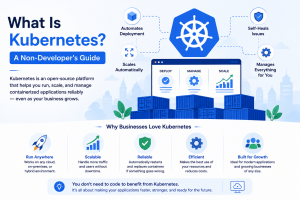
In technical terms, Kubernetes is an open-source platform used to automate the deployment, scaling, and management of containerised applications.
Once your application is packed into containers, using something like Docker, Kubernetes takes over the job of running those containers reliably: starting them, replacing any that fail, adding more when traffic increases when scaling is configured, and removing extras when things quiet down.
The word “orchestration” fits exactly the way the conductor analogy describes it. A conductor does not play every instrument themselves; they make sure each musician comes in at the right time, stays in sync with everyone else, and gets corrected the moment something goes off.
Kubernetes does the same thing with containers instead of musicians: it does not run your application’s code directly; it makes sure every container is running where it should be, stays healthy, and gets replaced the moment something goes wrong, all without a person having to step in and fix it manually every time.
At its core, Kubernetes exists to automate three things: getting containers deployed, scaling them up or down as needed, and managing their health without someone sitting there watching every single one. That is the whole job, whether it is one small app or hundreds of containers spread across many servers.
Going back to the fruit seller, this is the part where the analogy really pays off. It is not just about protecting one box of fruit from one warehouse to one shop. It is about hundreds of these boxes going out every day to different retailers in different cities, with demand changing constantly – more boxes needed during a festival, fewer on a slow week. Kubernetes is what makes that entire operation run itself.
In the real world, this shows up in a few common ways:
Instead of a single large application, many modern apps are split into several smaller, independent pieces, one for login, one for payments, one for search, etc. All of these are separate pieces that work in sync. Kubernetes helps manage their deployment, scaling, and availability, rather than someone managing each one manually.
When a team pushes new code, it usually goes through a process of automatic testing and release called CI/CD. And Kubernetes fits in here, rolling out new versions of an application smoothly and supporting rollbacks if something breaks, without the site or app necessarily going down in the process.
Some businesses run their infrastructure across several cloud providers or between their own servers and the cloud. Kubernetes is the same across all these environments, so the same application does not need to be rebuilt differently depending on where it is running.
You have probably heard the term ‘DevOps’ thrown around a lot, especially if you work anywhere near a tech team, so it is worth explaining plainly before connecting it to Kubernetes.
DevOps is just the practice of the people who build software and the people who run the servers working closely together, instead of being two separate teams that barely talk to each other. The whole point is releasing software faster, with fewer mistakes, and with a lot more automation replacing manual, repetitive work.
Kubernetes fits into this picture as one piece of a much larger toolchain, not the whole thing. A typical DevOps process usually involves:
This is where Kubernetes actually takes over once the code is tested and the servers are ready. It runs the production app in containers and keeps it running right, day after day, without anyone having to dive in every time something breaks or the traffic spikes suddenly.
This is really why Kubernetes became such a central part of modern DevOps. Before it existed, keeping an application running reliably at scale meant a lot of manual server management, restarting things that crashed, adding more servers by hand during busy periods, and constantly watching for problems.
That kind of repetitive, error-prone work is exactly what DevOps as a whole is trying to get rid of, and Kubernetes automates precisely that piece of the puzzle.
You have probably also come across the term ‘cloud-native’ somewhere, and it is worth clearing up what it actually means before connecting it to Kubernetes. Cloud-native does not just mean an application is running on the cloud; plenty of old-style applications get moved onto cloud servers without really changing how they work underneath, and that is not the same thing at all.
‘Cloud-native’ means an application is actually built to take advantage of what the cloud is good at: scaling up and down easily, recovering automatically when something fails, and running across many servers instead of being stuck on just one. Kubernetes is one of the core tools that makes this possible.
This matters even more once you consider that businesses are rarely locked into just one cloud provider. The three biggest are:
Kubernetes runs consistently across all three, along with private and hybrid setups too. So an application built to run on Kubernetes does not need to be rebuilt from scratch just because a business decides to switch providers or wants to run partly on one cloud and partly on another. This is a big part of why it became the standard for cloud-native infrastructure rather than staying tied to any single provider.
Everything we have talked about so far has been about what Kubernetes does. This section is about how it actually does it: the pieces underneath that make the whole thing work, explained in the same simple way, without needing a developer background to follow along.
Think back to the fruit seller. Kubernetes managing hundreds of fruit containers is not one single thing happening; it is really three parts working together: a group of machines actually storing and carrying the fruit, a decision-maker figuring out which machine gets which container, and the individual boxes of fruit themselves, sitting inside those machines.
That is exactly how Kubernetes is structured, just with technical names attached to each part
If you are wondering what a Kubernetes cluster is, in the simplest terms, it is a set of machines that function as one system rather than just one machine trying to do everything alone. The machines are called nodes, and the collection of these nodes is what will run your application.
Let us go back to the example of the fruit vendor: instead of having just one big warehouse trying to store and manage each fruit container all by itself, you have several small warehouses distributed around, all operating as one unified network. This network of warehouses is the cluster. The warehouse is the node, and the containers and pods running on those nodes are the actual workloads.
So the relationship is simple: the cluster is the whole system, nodes are the individual machines making up that system, and workloads are the actual containers running on top of those nodes.
If the cluster refers to the entire network of warehouses, the control plane becomes the headquarters that decides what will happen where. This is the component of Kubernetes in charge of making all decisions, including where to allocate a particular container, how to react to failures, etc.
In practice, the control plane itself is built out of several components interacting with one another: an API server (in charge of receiving orders on what should be done), the scheduler (responsible for allocating containers onto nodes), the controller manager (responsible for monitoring the system and fixing the issues, if any occur) and etcd (responsible for storing the cluster’s state and configuration, like a master record of what the cluster should and does look like).
It is not necessary to learn by heart each of these components separately in order to get an understanding of the bigger picture. All you have to remember is this: the control plane is the brain of Kubernetes – it does not carry the fruit but decides where each container should be allocated and monitors its status.
Nodes were briefly introduced earlier; they are individual computing units within the cluster that perform all of the computational tasks. A node also runs the components needed to manage Pods, including the kubelet and a container runtime. However, there is still one element that exists between the node and the user’s application: the pod.
A pod is the smallest entity that Kubernetes manages and creates. Instead of running a container on a node right away, it first places it into the pod. In most cases, a pod contains only one container; however, several closely related containers may be contained within one pod at times.
Finally, relating the concept to the fruit seller example once again: a Kubernetes node is the warehouse, a pod is the crate contained within it, while the container is the sealed package of fruit placed inside the crate. It is important to note that Kubernetes manages Pods and the workloads they contain; a Pod is created, replaced or removed depending on the desired state.
Thus, the hierarchical structure, from top to bottom: the cluster is the network of warehouses, nodes are the individual warehouses, pods are the crates contained within them, and the containers are the sealed packages inside these crates.
By now you understand the core structure: cluster, control plane, nodes, and pods. A few more terms come up constantly once you start reading about Kubernetes, and it helps to know what each one actually means before you run into them elsewhere.
It is how you tell Kubernetes what you want running and how many copies of it. Instead of manually starting pods one by one, you describe the desired state, say, “Keep three copies of this container running at all times”, and Kubernetes handles the rest, including rolling out updates gradually and replacing any pod that crashes or disappears, without you needing to step in each time.
It is a way of dividing up a single cluster into separate, isolated sections. Think of it like separate folders on the same computer; everything technically lives on the same machine, but keeping things organised into namespaces means different teams or different projects will not accidentally interfere with each other, even though they are all sharing the same cluster underneath.
A service solves a problem that comes up naturally with pods: pods can be replaced or restarted at any time, and every time that happens, they can get a new internal address. A service gives a stable, unchanging way to reach a group of pods, so the rest of your application always knows where to send a request, even as the actual pods behind it come and go.
It is a set of rules that lets traffic from outside the cluster reach the right place inside it. Without ingress, the services it routes to are not directly reached through those ingress rules. An ingress controller is the specific piece that implements these rules; it reads the rules you set and directs incoming visitor traffic to the correct service, similar to how a receptionist directs visitors to the right department once they walk through the front door.
Most people get confused about what a Kubernetes operator is. The operator takes automation a step further for more complex applications, ones that need specific, specialised knowledge to run correctly, not just started and left alone.
An operator encodes that specialised knowledge directly into Kubernetes, so tasks a human expert would normally need to handle manually (like properly backing up a database or safely upgrading it) get automated as well.
Helm is often described as the package manager for Kubernetes, and that description holds up well. Instead of writing out every single configuration file needed to deploy an application from scratch,
Helm lets you package all of that into a reusable bundle, called a chart, and install or update the whole thing with one command: the same way installing an app on your phone does not require you to configure every setting manually first.
This is probably the single most common confusion people run into when they first start reading about Kubernetes, so it is worth addressing directly. Kubernetes and Docker are not two competing tools trying to do the same job. They are not alternatives to each other at all — they solve two completely different problems, and in most real setups, they actually work together, not against each other.
Go back to the fruit seller one last time. Docker is the tool used to build and run containers: the sealed boxes that keep one type of fruit safe, fresh, and protected, no matter where they travel or what environment they end up in. That is the basic job. Docker packages something so it can run consistently across environments. Kubernetes manages those containers rather than packaging the application itself.
Kubernetes is the operation managing hundreds of these containers at once: deciding which warehouse each one goes to, replacing any container that fails, and, when scaling has been configured, sending out more containers when a festival sale creates a sudden spike in demand. Docker builds and runs containers. Kubernetes manages and orchestrates many containers at scale.
This is essentially what Kubernetes and Docker mean in a common workflow. Docker can build and run containers on a machine, while Kubernetes works at the next higher level, managing many containers across one or more machines simultaneously. As part of the common workflow process in real-world situations, the developer would use Docker to build a container image out of their application first and then use that image with Kubernetes, where the execution of the container will be managed.
One small technical note worth knowing: Kubernetes itself no longer uses Docker directly as its container runtime; it uses runtimes such as containerd and CRI-O instead. Docker can still be used to build your container images, which Kubernetes can then run through a compatible runtime underneath.
| Factors | Docker | Kubernetes |
| What it actually is | A tool for packaging and running individual containers | A system for managing many containers across many machines |
| Main job | Packaging an application so it runs the same way anywhere | Orchestrating, scaling, and healing containers automatically |
| Works on | A single host/machine | A cluster of many machines working together |
| Handles scaling? | Not on its own | Yes, this is one of its core jobs. |
| Handles failure recovery? | No | Yes, it automatically replaces failed containers. |
| Fruit-seller analogy | The sealed container protecting one type of fruit | The whole operation managing hundreds of containers, warehouses, and deliveries |
| Do you need both? | Yes, in most real-world workflows | Yes, Kubernetes typically manages containers. that Docker created |
Running Kubernetes yourself, from scratch, means setting up and maintaining the entire control plane we talked about earlier, the brain of the operation. That is a real technical undertaking, and most businesses do not want to spend their time managing that infrastructure themselves. This is exactly why the major cloud providers now offer managed Kubernetes services, where they handle the control plane for you, and you just focus on running your actual application on top of it.
The three big ones you will come across constantly are:
Amazon’s managed Kubernetes offering on AWS. If you are already running your infrastructure on AWS, this is the natural way to run Kubernetes there without managing the control plane yourself.
Microsoft’s equivalent on Azure, offering the same managed convenience for businesses already invested in the Azure ecosystem.
Google’s managed Kubernetes service, and it’s worth mentioning that Google is actually where Kubernetes originally came from, so GKE tends to be closely tied to the latest Kubernetes developments.
All three do fundamentally the same job: they take the hardest, most technical part of running Kubernetes, the control plane, off your plate, so you get the benefits of orchestration without needing a dedicated team just to keep the underlying system alive.
None of this changes the core idea we have covered throughout this guide, though. Whichever managed service you choose, you are still working with the same clusters, nodes, pods, and deployments explained earlier; the cloud provider is just handling the “brain” of the operation on your behalf.
If you are exploring Kubernetes but are not tied to a specific cloud provider yet, this is also where the right hosting foundation matters. host.co.in’s cloud Hosting and VPS hosting give you the infrastructure to run and scale containerised applications reliably, without locking you into one provider’s ecosystem before you have decided what your setup actually needs.
What is Kubernetes in simple words?
Kubernetes is a system that automatically manages containers for you — starting them, keeping them running, replacing them if they fail, and adding more when demand increases, without you needing to watch over them manually.
What is Kubernetes, with an example?
An online store running a big sale is a good real-world case. Traffic spikes suddenly, so Kubernetes can automatically start more containers when scaling has been configured, then scale back down once the sale ends. If a container crashes under pressure, Kubernetes replaces it without anyone needing to notice.
How does Kubernetes work?
Kubernetes works by constantly checking what you told it you want – say, “always keep five copies of this running” – against what is actually happening and automatically fixing any gap between the two. The control plane makes the decisions, and the nodes and pods carry them out.
Does using Kubernetes mean I no longer need Docker?
No, this is a common misunderstanding. You can still use Docker to build your application into a container image, but Kubernetes does not require Docker as its container runtime. Kubernetes takes over the management of containers once the image is available, using a compatible container runtime underneath.
Is Kubernetes only for large companies?
It is genuinely more common in larger, complex setups, since that is where its scaling and self-healing capabilities earn their keep the most. A small project running on one server rarely needs it. Kubernetes starts to make real sense once you have multiple containers, unpredictable traffic, or a genuine need for things to keep running without manual intervention.
Do I need to know how to code to use Kubernetes?
Not to understand what it does – no, that is exactly why this guide has avoided technical jargon throughout. Actually setting up and configuring a Kubernetes cluster does need technical skill, which is part of why managed services like AWS’s EKS or Google’s GKE exist, handling the harder setup work for you.
What are the main features of Kubernetes?
This is the main reason behind the existence of key components such as scaling (enabling addition/removal of containers according to demand, depending on configuration for scaling), self-healing (replacement of Pods that have failed), and load balancing (balancing of the load across available backends)
Kubernetes is there to automate the heavy lifting of running containers at scale. Orchestration, scaling, networking, self-healing. One system does it instead of a human having to do it for every piece. Back to the beginning:
With Docker, you can package an application into a container image designed to run consistently across environments, and Kubernetes can take that image and run it reliably, at scale, across many machines. They’re not two tools fighting over the same function.
They’re two different parts of a common container workflow.
Whether you’re packaging your first container or running hundreds of them within a full cluster, it all needs real infrastructure underneath to actually run on host.co.in’s VPS Hosting and cloud hosting provide that foundation, built to support containerised applications as they grow from a single container to a fully orchestrated cluster.

Prathamesh Suryawanshi