
It feels great when you receive a seamless browsing experience and everything online just works; you click a link and the page loads within seconds, or you want to check your bank balance or book a cab online, and everything happens in a flash of seconds, thanks to a fast and reliable web server working behind the scenes. Doesn’t it all seem easy? But there is always a connection between web clients, web servers, and web hosting that keeps the internet running.
This blog talks about the different roles of web clients and web servers, how they talk to each other, and some real-world examples of how they can be used. We’ll also take you through web server and web client differences together with insights into their future trends and operational complexities.
In light of this, let’s break down what a web server and a client are.
Web servers are the driving force behind the content delivery. It is this crucial component that is responsible for handling and responding to client requests. It stores, processes and delivers web content like pages, graphics, files, and other content through HTTP/HTTPS protocols.
Without web servers, users are unable to access websites and web applications.
Whether you’re a complete amateur, just starting your online journey, or an experienced professional, it is important to know about the constituents of the internet, such as application servers, network infrastructure, etc. Read our thorough guide on web server vs application server: differences, examples & list to know more.
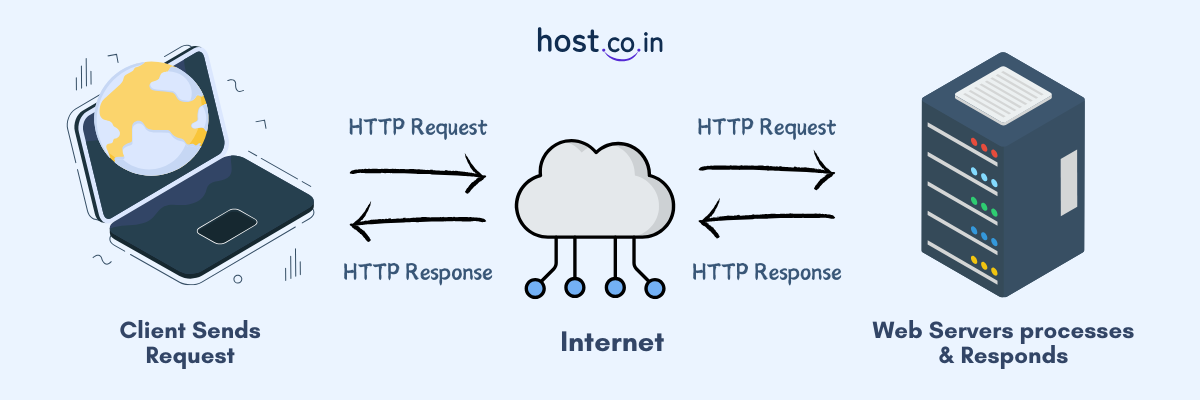
The request-response cycle takes only a few milliseconds to finish, and it happens again and again when a user goes to a new page or asks for other web content, like images or forms.
A variety of web server software platforms are available in the market, each known for its own strengths:
A web client is basically a program or device that communicates with a web server to request website data, services, or other web resources. It interacts with the web servers on the user’s behalf by using the protocols such as HTTP or HTTPS. Web browsers like Google Chrome, Mozilla Firefox, or Safari are some of the most commonly used examples of web clients users depend on to access websites.
Mobile apps, IoT devices, or some command-line tools such as curl that interact with APIs are some other examples of web clients. In short, if a tool is capable of sending requests to a web server and waits for the answer can be defined as a web client.
| Features | Web Server | Web Client |
| Primary Function | Respond to incoming requests | Send requests |
| User | Developers, web hosts | End users |
| Examples | Apache, Nginx, Microsoft IIS | Chrome, Firefox, Mobile Apps |
| Function | Saves, processes, and provides content to user | Presents and allows online interaction |
| Connection | Awaits for clients requests | Starts communication |
| Data Processing | Permanent storage for website data | Provides temporary storage like cache and cookies |
| Security Function | Manages SSL encryption and filters data | Checks SSL certificate and alerts users |
| Execution Style | Server-side processing | Browser-based rendering and scripting |
The following examples will help you better understand what is web server and web client, and how it works in real-world applications.
When you buy something on Flipkart, Myntra, or eBay, your browser, i.e., web client asks for pages with products on them. The application server on the website gets the data from a database server and then shows it to you.
Why it’s client-server: Multiple servers (web and database) work together to handle client requests.
It shows exactly how a web client and server work together.
When you check your balance or move money through a bank’s mobile app, for example, your phone (the client) talks to the bank’s backend servers to make sure the transactions go through.
Why it’s client-server: The server does safe tasks and sends answers back to the client.
Apps on mobile devices are also clients; they don’t work alone, they do talk to servers in real time every time you do something in it.
For example, when you put a file on Google Drive or Dropbox, your device acts as the client that sends the file to the server in the cloud. The server then protects the data and makes it available later.
The client-server model is used because the client needs the remote server to store and get data.
In multiplayer games like Fortnite, for example, your game client talks to a game server that keeps track of where players are, what they’re doing, and their scores in real time.
It’s a client-server system because the web server keeps track of the game’s state, and clients send and receive updates.
It is a great example of client-server communication that needs to be fast and reliable.
The following are some of the latest trends of web servers and web clients.
In spite of the fact that web clients and servers can operate on any operating system, still there are a few major differences between them:
| Features | Client Operating System | Server Operating System |
| Purpose | Developed for easy-to-use interface and daily tasks | Developed to deliver stability, reliable performance, and multiple users |
| Examples | Windows 10, macOS, Ubuntu | Windows, Ubuntu, Red Hat Enterprise Linux |
| Customer Base | Single user | Multiple users |
| Services | Focus on user-friendly design, media features, and task management | File sharing, hosting websites, and managing network systems |
| Safety | Fundamental security measures | Advanced security measures |
Web clients and web servers have different but connected roles in the digital world. Where Web servers manage HTTP requests and send content back to the users. On the other hand, web clients receive this information, understand it, and show it to users. With the help of these together, businesses and developers make web platforms that are powerful, scalable, and safe.
Continue exploring the world of the internet and check out our related blogs on web servers and application servers because the internet has lots more to explore!

Pooja Patil