A webhook is a simple way for one application to tell another application that something has just occurred. Instead of polling for updates, the receiving system is notified of a defined event with an automated HTTP request (often with event data in JSON format).
Think of it as a digital doorbell. You do not stand at the door every few minutes asking whether someone has arrived. When a visitor presses the bell, you are alerted immediately and can respond. In the same way, a webhook “rings” a URL when an event, such as a successful payment, a new form submission, or a code push, takes place.
Instead of the receiving application polling for updates repeatedly, a webhook makes an automated POST request to a pre-configured URL (the “endpoint”) with data from the event. A webhook is an HTTP callback: an HTTP request that is sent to the web application in real-time.
This is borrowed from the older programming idea of a “hook”, which is a point in the software you can plug your own code into that will run automatically when a certain event happens without changing the original program. Imagine it literally: like a hook on a wall where you can hang stuff. In code, a “hook” is a place where you can “hang” your own function, and it will be fired automatically when that event fires.
A “webhook” just takes that same idea out onto the web. Instead of running a function inside the same program, the hook sends an HTTP request to a URL on the internet when that event happens. So “hook” is the automatic trigger-and-response behaviour, and “web” just indicates it happens over HTTP rather than in a single app.
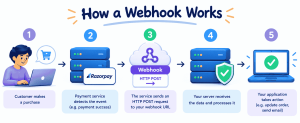
The doorbell already gave you the shape of it. Here is exactly what happens between someone ringing it and you answering, broken into five steps.
Everything starts inside the source application, the one that will eventually send the notification. This could be a customer completing a payment, a new row added to a spreadsheet, or a developer pushing code to a repository. At this point, nothing has left the application yet; something has simply happened that the application knows how to recognise.
The source application checks whether this particular event has a webhook configured against it. If it does, that webhook fires automatically; no person clicks a button or manually starts this process. This is the “hook” doing exactly what it was set up to do, firing the moment its matching event occurs, without anyone needing to be watching for it.
The application gathers necessary information (what happened, when, and any other data the receiving system may require). It transmits it as an HTTP POST request to a preconfigured webhook URL, typically with the payload in JSON format.
On the other end, the receiving application’s server listens at the webhook URL. Once the request arrives, the server reads the payload and performs the required action, such as updating a record, sending an alert, or triggering another workflow. Different automation tools handle these tasks in different ways. An automation tools comparison can help you understand how different tools support workflow automation and application integrations.
The receiving server sends back a response, usually a simple HTTP status code, confirming that the data arrived and was handled. If that confirmation does not come through, the sending application generally knows to retry the request.
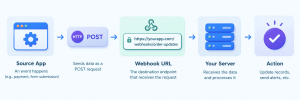
A webhook URL is the address the sending application delivers its data to, the one you configured back in Step 3. It is often called an endpoint, since it is the exact point where the request ends up and the receiving server picks it up. Unlike a web page’s URL, nobody types this into a browser or clicks a link to reach it. It sits there quietly, waiting for a specific kind of automated request.
A webhook URL usually looks like any other URL at first glance:
https://api.yourapp.com/webhooks/order-updates
What makes it a webhook URL is not its shape but its job. This particular address exists for one reason: to receive POST requests from another system whenever an order update happens and to know what to do with the data once it lands.
A normal website URL is built for a person. You type it into a browser, which sends a GET request and loads a page for you to read. A webhook URL is built for another application. It expects a POST request carrying data and usually returns an HTTP status code rather than a page meant for people. The two can look identical in a browser’s address bar, but what each one is waiting for, and who it is waiting for it from, could not be more different.
Knowing how a webhook fires is only half the picture; the other half is what actually arrives when it does. This section covers exactly that.
JSON

{

"event": "order.completed",

"order_id": "4521",

"amount": 899,

"currency": "INR",

"timestamp": "2026-09-21T14:32:00Z"

}Everything covered so far has been about how a webhook works in principle. This section is simpler, just where you will actually run into one.
You know what “webhook meaning” by now. Here is how you actually set one up.
Webhooks are not the only way systems communicate. Here is how they compare to the alternatives you will probably run into.
An API is something you ask for. You send a request whenever you want data, and it sends something back. A webhook is something that tells you; it fires on its own the moment an event happens; no request from you is needed. Most systems actually use both together: an API to set the webhook up in the first place, then the webhook takes over from there.
Polling is checking again and again, hitting an API every few seconds or minutes just to ask, “Anything new yet?” Most of the time the answer is no, and you have burnt a request finding that out. A webhook skips all of that. Nothing happens until there is actually something to say; then it says it immediately.
A webhook fires once, delivers its data, and the connection closes. A WebSocket stays open, a live, two-way line between two systems that can keep talking back and forth for as long as the connection lasts. Webhooks suit single events: a payment, a signup, a push. WebSockets suit anything that needs a constant stream: a live chat, a price ticker, or a multiplayer game.
Not every webhook plays the same role. Here are the three you will actually run into.
Every real-time system, an automated setup running on its own, has trade-offs, and webhooks are no exception. This section covers what makes them worth using and where they genuinely fall short.
Yes, a webhook needs a publicly reachable server to receive requests. Learn when shared hosting works, when a VPS makes sense, and how serverless fits webhook traffic.
Yes. A webhook needs somewhere to land, and that somewhere is a server running code, waiting at that URL for a request to arrive. Without one, there is nowhere for the “doorbell” to ring.
The sending application is reaching out from the outside, so your endpoint has to be reachable from the outside too. A server sitting on your own laptop, behind your home network, is not visible to the rest of the internet, so nothing external can ever deliver a request to it without extra setup, a tunnelling tool, a public IP, or something bridging that gap.
For light, low-traffic webhooks, often yes. If your hosting supports server-side scripting and can accept incoming requests, that is really all a basic webhook receiver needs. Linux Shared Hosting can be a suitable option for small applications that need to receive occasional webhook notifications. However, where shared hosting starts to struggle is volume and control; shared resources mean shared limits, and you are working within whatever the hosting environment allows rather than configuring it yourself.
A VPS earns its place once a webhook setup outgrows what shared hosting comfortably handles, higher volume, custom software requirements, or just wanting full control over how the server behaves. Running your own environment means you decide what is installed, how requests get processed, and how much capacity is actually available when traffic spikes.
Serverless fits webhooks unusually well, since a webhook is already event-based: something happens, code runs, and nothing runs the rest of the time. A serverless function can remain idle between requests and execute when a webhook arrives, process the payload, and shut down again, depending on the provider’s execution model. For applications that need more control over their infrastructure and resources, Cloud Hosting can also be an option. It provides flexibility to handle changing workloads and webhook traffic as application requirements grow.
Webhooks are convenient precisely because they’re open: a URL that quietly listens for data and acts on it the moment it arrives. But that same openness is exactly what makes them a target. If you don’t lock down who can send data to that endpoint and what happens to it once it lands, you’re basically leaving a side door to your application unlocked and hoping nobody tries the handle.
Here’s what actually keeps a webhook secure.
Webhooks work beautifully right up until the moment they don’t — a server hiccup, a network blip, or your endpoint is mid-deploy when the payload arrives. None of that is unusual. What separates a reliable webhook system from a fragile one isn’t whether failures happen; it’s whether you’ve actually planned for them.
Deliveries fail for reasons that are rarely dramatic. Your server might be temporarily down for a deploy. A network issue could drop the request mid-transit. Your endpoint might be slow to respond and get treated as unresponsive. Or your application might return an error code because something on your end choked on the payload. None of these mean the webhook system is broken — they mean the internet is exactly as unreliable as it’s always been, and your system needs to expect that rather than be surprised by it.
Most providers won’t just send a payload once and shrug if it fails. If your endpoint doesn’t return a success response, typically a 2xx status code, within a certain window, the provider will retry the delivery, usually several times, often with increasing delays between attempts (commonly called exponential backoff). This gives your system a second, third, or fourth chance to catch a payload it missed the first time around, without the provider hammering your server nonstop.
Here’s the catch with retries: if your endpoint actually did process the payload successfully but the success response got lost on its way back, the provider has no way of knowing that — so it retries anyway. Now you’ve technically received the same event twice.
Say a user pays ?500 on your website. Your payment provider sends a webhook to notify your server, and your endpoint processes it, deducts the amount, logs the transaction, and fires off a “payment received” notification to the user.
But right as your server sends back its success response, the network hiccups and that response never makes it back to the provider. As far as the provider knows, the request failed, so it retries. Your endpoint receives the same ?500 payment event again, and if nothing’s stopping it, it processes it again too, sending the user a second “payment received” notification for a payment that only happened once.
Retry that loop a couple more times before it gives up, and the user could end up with three or four notifications for one ?500 payment.
Idempotency is what breaks that loop. It means designing your endpoint so that processing the same event multiple times produces the same result as processing it once: no duplicate notifications, no duplicate ledger entries, and nothing that makes it look like the user paid four times when they paid once.
The most common way to achieve this is by tracking a unique event ID sent with each payload and checking whether you’ve already processed that ID before acting on it again.
In practice, this comes down to keeping a record – a table, a cache, or whatever fits your stack- of event IDs you’ve already processed. When a new payload arrives, check that ID against your record first. If it’s already there, acknowledge the request and skip reprocessing. If it’s new, process it and log the ID. This one habit quietly prevents most of the “why did the customer get charged twice” tickets before they ever happen.
Your endpoint should be built to respond fast, acknowledge receipt of the payload immediately, then do the actual processing asynchronously in the background. If your endpoint takes too long to respond because it’s doing heavy processing inline, the provider may treat it as a timeout and retry, even though your system was actually working on it. Pair that with a dead-letter queue or error-logging system to catch events that fail even after all retries are exhausted, so a handful of stubborn failures don’t just quietly vanish into the void.
Designing a reliable system is one thing; actually catching what’s wrong with a specific webhook that’s misbehaving right now is a different skill entirely. This is less architecture, more detective work.
Before trusting a webhook in production, put it through its paces deliberately. Most providers offer a way to send test events straight from their dashboard, which is the easiest starting point. For local development, tools like ngrok or a similar tunnelling service let you expose your local server to the internet temporarily, so you can receive real webhook calls without deploying anything. Trigger the actual event that’s supposed to fire the webhook, a test payment, a mock signup — and confirm the whole chain, end to end, actually works.
When something’s not behaving, the fastest way to find out why is to actually look at what’s arriving. Log the full incoming request, headers, payload, and timestamp so you can compare what you expected against what you actually got. Tools like webhook. site or RequestBin are handy for a quick, no-setup look at raw incoming requests before you’ve even wired up your endpoint to do anything with them.
A few issues show up again and again: the endpoint returns a non-2xx status code, and the provider assumes it failed; the signature verification fails because the secret key doesn’t match or the payload was altered before it reached your check; the endpoint times out because processing is happening inline instead of asynchronously; or the payload structure changed on the provider’s end, and your validation logic didn’t expect the new shape.
Most of these trace back to the same short list of fixes. If you’re seeing failed deliveries from non-2xx responses, check what your endpoint is actually returning; a silent server error often masquerades as a delivery problem. If signature checks are failing, double-check you’re using the raw, unparsed request body to compute the signature, not a body that’s already been transformed by your framework.
If you’re seeing timeouts, that’s usually a sign it’s time to bring in the async pattern covered earlier: respond fast, and process after. And if duplicate events start showing up, that’s your idempotency logic doing exactly what it’s supposed to do, catching a retry rather than something being broken.
Knowing how to create webhook endpoints is only half the job; running them properly is the other half. A few things worth getting right from the start:
A webhook site is a tool that gives you a temporary URL to receive and inspect webhook requests, useful for testing before you build a real endpoint. Instead of guessing what a payload looks like, you send a test event to the webhook site and see the actual data arrive.
Near real-time, not instant. A webhook fires the moment an event happens, but there is still a small delay while the request travels across the network and gets processed on the other end, milliseconds to seconds, not the minutes or hours polling can involve.
Yes. If you want to know how to create a webhook, it comes down to two things: an application that fires a request when an event happens and a server ready to receive it. Both sides are entirely something you can build yourself.
Polling and WebSockets are the two main ones, each covered earlier in this guide. An API request on its own is also an alternative when you only need data occasionally rather than the moment something changes; webhook vs API really comes down to whether you want to ask or be told.
Yes, always. A webhook needs somewhere to land, a server, or a serverless function standing in for one, waiting at a public URL for the request to arrive.
A webhook reacts to an event, delivers its data, and the connection closes. A WebSocket stays open, a live, two-way line between two systems that can keep exchanging data for as long as the connection lasts. Webhooks suit single, one-off events; WebSockets suit anything needing a constant stream, covered in more detail earlier in this guide.
A webhook is a simple idea underneath all the detail this guide has covered: one application telling another the moment something happens, instead of being asked over and over whether anything has changed. That is the whole meaning of a webhook, no more complicated than a doorbell ringing exactly when it is meant to.
Whether you are setting one up for the first time, connecting a webhook for Slack, or just trying to understand how a webhook actually works behind an app you already use, the mechanics stay the same: an event happens, a request goes out, and something on the other end reacts. Get that one idea, and everything else in this guide – the URLs, the payloads, the retries, the security- is just detail sitting on top of it.
If you need reliable hosting for your webhook-based applications, host.co.in offers Linux Shared Hosting, Cloud Hosting, and VPS Hosting to support applications of different sizes. With 24×7 support and secure hosting infrastructure, you can choose a plan that fits your requirements and helps your applications run smoothly as they grow. Explore host.co.in hosting plans to find the right fit for your project.

Madhavi Potdar